
When I first started using Wispr Flow, I had no idea it would offer me this much freedom.
When we think about automation, we think about wiring things together. Connecting functions, connecting dots, creating an output. We think of mechanics first. We would never take it for granted that typing itself can be automated, and that is exactly what dictation tools do when they work properly. Your voice, your words, once transcribed through a microphone, becomes automated typing. Wispr Flow has become my biggest cheat code and one of my best automation hacks. It automates my input. It automates my coding. My voice has become a replacement for what my fingers used to do.
I never thought I would sit down to write a review of a dictation tool. But Wispr Flow is giving me something I did not know I needed: the ability to think clearly and ship faster at the same time.
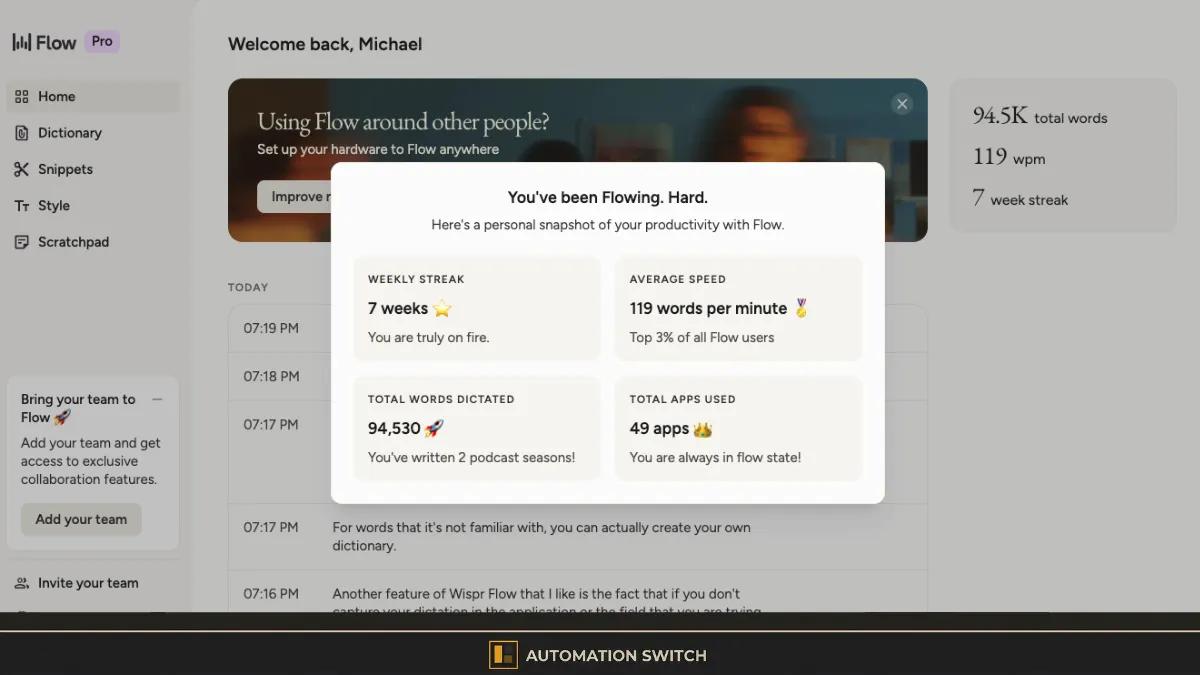
I have been using Wispr Flow for seven weeks. As I write this, I have dictated 94,530 words across 49 applications. That is an average of 119 words per minute, which puts me in the top 3% of all Wispr Flow users. This article looks at how Wispr Flow facilitates a form of automation that most builders overlook: input automation.
What Wispr Flow Actually Does
For readers arriving cold from search: Wispr Flow is a voice-to-text application available on macOS, Windows, iOS, and Android. It works in any text field on your machine. Email, Slack, VS Code, Claude, your browser address bar. Wherever your cursor is, Wispr Flow can type for you.
The core product is real-time voice-to-text with AI-powered formatting. It applies context-aware corrections, matches the tone of the application you are typing into, and handles over 100 languages including mixed-language dictation. It is SOC 2 Type II compliant and offers HIPAA compliance on all plans, including the free tier.
The free tier gives you 2,000 words per week. The Pro plan runs $15 per month, or $144 per year if billed annually. One subscription covers all platforms with synced preferences across devices.
That is the product overview. The rest of this article is about what happens when you use it every day for seven weeks.
The Cognitive Shift: From Typing to Thinking Out Loud
Initially I was reluctant. When I typed, the act of writing allowed my brain to process what I wanted to say. My keyboard and my fingers were downstream of what my brain would process. There was a middle layer of synthesis: I would think of an idea, synthesise it in my mind, then output it through my fingertips.
Wispr Flow has given me the same thing, in a different form. Now I have to be conscious about what I am thinking before I speak it. The synthesis still happens, but the output channel has changed. Instead of translating thought into finger movements across a keyboard, I translate thought into spoken words.
What you find is that this changes the quality of the synthesis itself. When I typed, I could be sloppy. I could half-form a thought and let my fingers sort it out on the screen. When I speak, the thought has to be formed before it leaves my mouth. There is no backspace in speech. There is no rearranging words mid-sentence. The thought has to arrive whole.
The Fn button on my Mac has become one of my most-used keys. It quickly ascended in the hierarchy of keyboard shortcuts. From something I used to grab emojis or trigger backspace, it is now the key I reach for when I need to get things out of my head. When I want to make notes. When I want to write emails. When I want to send messages. When I want to type into a browser address field.
What I have now is the ability to get the message out of my head, put it through something like Grammarly to refine it, and send it. I have reclaimed time I used to spend agonising over phrasing. I have a sense of confidence now that when I take on a responsibility requiring an email or an article, my follow-through will have less friction.
I have always worked in a way where my first draft is never the refined draft. Wispr Flow allows me to get the first iteration phase out of the way quickly, then walk away from it, come back, and iterate at a second pass. The speed of that first pass has changed everything about my output volume.
The Numbers: 94,530 Words in Seven Weeks
Hard data, because enthusiasm without evidence is just noise.
Approximately 13,500 words per week across 49 applications. The raw dictation speed during sustained flow is higher than the 119 WPM average, which includes pauses for thinking and mid-session corrections.
Over seven weeks of daily use, I have dictated 94,530 words through Wispr Flow across 49 different applications. That averages out to approximately 13,500 words per week at an average speed of 119 words per minute. Wispr Flow tells me that puts me in the top 3% of all users on the platform.
For context: the average typing speed for professionals sits around 40 to 60 words per minute. A fast typist might hit 80. I was dictating at roughly double the speed of a fast typist, and the output required less editing than I expected.
Wispr Flow's own benchmarks suggest users typically hit 150 to 220 words per minute. My 119 WPM average includes pauses for thinking, re-reading, and mid-session corrections. The raw dictation speed during sustained flow is higher.
Here is what matters about the volume: in seven weeks, I would have never typed 94,000 words. The volume alone would not have happened at keyboard speed. But more importantly, these words are contributing to tangible artefacts. Coding prompts, article dictation, LLM instructions, meeting note generation, and email composition. Every word dictated into Wispr Flow became an input to something that shipped. I am speaking, but these words are actually creating.
The compounding effect is real: when your input speed doubles, your iteration speed doubles with it. And when iteration speed doubles, the gap between "I have an idea" and "I have a working output" shrinks to minutes.
Where Wispr Flow Beats the Alternatives
I have tried other dictation tools. The gap is real.
iOS Dictation. When I started using Claude and noticed how much I was typing, I asked Claude for the best way to introduce dictation into my workflow. It gave me a list of options, and one was the built-in iOS dictation. The number of setup steps required put me off because they took me out of my flow state. When I did eventually try it, the accuracy required constant re-editing.
Otter. I tried setting up Otter, but it gave me more than I needed. It can integrate into Zoom. It offered different channels and auto-chat features. For what I do, it offered more than I was asking for, and understanding those features was overhead I did not need. I just wanted something to help with my dictation and my note-taking.
The broader landscape. Tools like SuperWhisper, Aqua Voice, MacWhisper, VoiceInk, and others exist. In a world where I am trying to be productive and optimise my workflow, I have not got the time to test all of them. What I do is find what works and if it ticks my box, it ticks my box. There is more friction in trying to evaluate every option and training each one than in finding something that works and sticking with it.
What I love about Wispr Flow specifically is its ability to clearly capture what I am dictating. Even my mumbles. Even my whispers. Other tools required me to go back and re-edit what I had spoken. Wispr Flow's accuracy, reportedly around 96 to 97 percent, means roughly 90 percent of my dictations require zero editing. That is the difference between a tool you use reluctantly and a tool you reach for instinctively.
The setup took less than five minutes. I was up and running in one session. I have not looked back since.
If you have tried any of the alternatives and found something worth switching for, I would like to hear about it. Until then, Wispr Flow is the tool in the slot.
Wispr Flow for Builders: Code, LLM Prompts, and Technical Work
This is the section that makes this article relevant to the Automation Switch audience specifically.
If we trace the history of coding, it started in binary. Over time, each generation of programming languages added another layer of abstraction to mask the complexity underneath. Assembly abstracted machine code. High-level languages abstracted memory management. Domain-specific languages abstracted infrastructure. Each layer made it possible to express more intent with less syntax.
We are now in a place where human-readable language is the input layer for code generation. The abstraction chain looks like this: natural language (typed or spoken) passes through an LLM, which generates code, which compiles or interprets into machine instructions, which eventually reaches the ones and zeros of binary. The middle layer, the code itself, is now generated from human intent expressed in common language.
Because human language is now the abstraction layer for coding, we do not have to type our code. We can speak it. Wispr Flow is a facilitator of that.
In practice, this changes how I interact with Claude, ChatGPT, and my code editors. Dictating a prompt to an LLM is different from typing one. When I type, I tend to be terse. I skip context. I abbreviate. When I dictate, I speak in full sentences. I provide more context, more constraints, more specifics. The prompts are richer, and the outputs are more closely aligned to my initial intent.
Here is a real example. Before Wispr Flow, when I was typing into Claude or working in a code editor, I would rarely go back to fix typos. I would let them sit and let the LLM infer what I meant. Nine times out of ten, it worked. This is something I would have typed:
"we want a place holder log for goldenpath iDP for our implementionof backstage so we dont use the defaullt branding.. Im thinkin blcak and yellow to represent gold or the defult grey that comes with the backstage branding and a yellow not sur"
The LLM understood it, but the intent is buried under misspellings and half-finished thoughts. Compare that to something I dictated through Wispr Flow and sent to a colleague:
"OK, now we have the issue of sidebars being sticky. Is it sticky? Basically, they just fix to one position. We need them to be able to flow with the user scrolling."
The difference is clarity of intent at the point of input. The typed version works because LLMs are forgiving. The dictated version works because the thought arrived fully formed.
Wispr Flow supports building prompts from mixed sources. Dictate the first part of a prompt, paste in a URL or code snippet, then continue dictating the rest. This produces richer, more precise instructions than pure typing because you naturally provide more context when speaking.
The same applies to code comments, commit messages, pull request descriptions, and Slack messages to your team. Anything that requires explaining intent in words becomes faster and more precise when spoken rather than typed.
The Communication Skills Angle
Wispr Flow offers me more than optimisation from a typing perspective. It is the biggest hack for improving my communication skills, and I did not see that coming.
When you dictate, you have to speak articulately. You have to speak clearly. You are forced to be intentional about how you communicate, because the tool is transcribing exactly what comes out of your mouth. Sloppy thinking produces sloppy dictation. Clear thinking produces clean transcription.
Based on my character type, I know that in the past I would have spent several minutes refining a message just to make sure it sounded right. Editing and re-editing before hitting send. What I have now is the ability to get the message out of my head quickly, refine it through Grammarly or Claude, and send it with confidence.
Wispr Flow forces me to speak with clarity. It forces me to think through my phrasing. And it does this whilst I am working, in the flow of production. The articulation practice is embedded in my working day rather than being a separate exercise.
For builders who spend time in meetings, on calls, or presenting to stakeholders: the clarity you develop through daily dictation transfers directly to how you communicate verbally in those contexts. You are practising clear speech for hours a day without realising it.
Features That Earn Their Place
Before getting to what could be better, three features deserve specific mention because they solve real workflow problems.
Filler word cleanup. Wispr Flow strips out your ums, ahs, and ohs automatically. If I am dictating and I pause to think, the filler sounds do not make it into the transcript. What is impressive is the context awareness: if I am talking about filler words (as I am doing right now in this dictation), Wispr Flow captures them as content. It distinguishes between filler sounds used as verbal crutches and the same sounds used intentionally as words. That is a meaningful level of intelligence in the transcription layer.
Clipboard fallback. If your dictation does not land in the application or text field you intended, Wispr Flow stores it. The desktop application keeps your most recent dictation in a text block you can copy and paste into wherever you need it. This means a missed cursor placement does not cost you the work. You retrieve it from the Wispr Flow app and paste it in.
Custom dictionary. For words Wispr Flow does not recognise, you can create your own dictionary. Wispr Flow remembers and retains those entries. When you dictate, it queries your stored dictionary and resolves those phrases or technical terms into your output. This is essential for anyone working in a specialised domain.
What Could Be Better
Every credible review needs this section.
- 96-97% accuracy on general dictation. Roughly 90% of dictations require zero editing.
- Works in any text field on any platform. Email, Slack, VS Code, Claude, browser address bars.
- Filler word cleanup with context awareness. Strips verbal crutches, keeps intentional uses.
- Custom dictionary for domain-specific terms. Add once, resolved automatically in future dictations.
- Clipboard fallback catches missed cursor placements. No dictation is lost.
- SOC 2 Type II compliant with HIPAA compliance on all plans including free tier.
- iOS performance lags significantly behind desktop. Mobile dictation requires frequent re-typing.
- Highly specialised jargon (idempotency, non-functional requirements) needs dictionary setup.
- Dictation sessions capped at 20 minutes. Extended writing requires periodic restarts.
- Precision requires precision. Lazy articulation produces lazy output.
iOS performance. The gap between Wispr Flow on desktop and Wispr Flow on iOS is significant. On desktop, the tool is seamless. On iOS, I find myself having to re-type entire sentences. I have resorted to not using it for most tasks on my phone. When I compare this against the native dictation in ChatGPT and Claude on iOS, the gap is one that Wispr Flow has not crossed. They need to fix this to bring the mobile experience on par with what native LLM apps provide.
Technical jargon, mostly. In my line of work I use technical language constantly: protocols, cloud computing, inference, observability, high availability, non-functional requirements, Kubernetes, hyperautomation, immutability. Wispr Flow handles the vast majority of these correctly. Where it struggles is with highly specialised terms. It transcribed "idempotency" as "item potency" and then "I had potency." The custom dictionary solves this once you add the term, but the first encounter with a niche word can produce something unrecognisable. For builders working with domain-specific vocabulary, expect to spend a few minutes populating the dictionary during your first week.
Precision requires precision. If I mumble or slur my words, Wispr Flow may not detect them properly. This is fair. The tool transcribes what it hears, and lazy articulation produces lazy output. This is also why dictation improves your communication: you learn quickly that precision in speech produces precision in text.
Dictation session limits. Sessions were recently extended from 5 to 20 minutes in March 2026, which is a meaningful improvement. For extended writing sessions, you still need to restart dictation periodically. This is a minor friction point that breaks flow during long drafting sessions.
Pricing and the Free Tier
The free tier is generous, and that is how I was pulled in.
You get 2,000 words per week on the free plan. When I first started, I thought that would be plenty. It was gone within the first two days. Once you are in the flow of dictating everything, from notes to emails to code, 2,000 words is a warmup.
The Pro plan is $15 per month, or $12 per month when billed annually at $144 per year. For what you get, this is real value for money. If dictation saves you even 30 minutes per day (a conservative estimate given my experience), that is roughly 15 hours per month. At any reasonable hourly rate, $15 is an asymmetric return.
One subscription covers macOS, Windows, iOS, and Android with synced preferences across devices. There is a 14-day free trial of Pro with no credit card required.
Wispr Flow pricing at a glance
Enough to test the workflow, not enough for sustained daily dictation.
- ✓2,000 words per week
- ✓Cross-platform account access
- ✓Good for initial evaluation only
The plan that turns Wispr Flow into a real daily input-automation tool.
- ✓Unlimited dictation across all supported platforms
- ✓$144/year when billed annually
- ✓14-day free trial with no credit card required
Verdict: Who Should Use Wispr Flow
A few days ago I was in my office. My sister came round to my home and pulled out her laptop. She was trying to complete a sponsorship form for a charity event, providing information about why people should sponsor her. She sat there looking at the user interface with half of her personal bio completed. I said, "Try Wispr Flow." Within five minutes she was set up and running. I left her to finish while I was in the other room. All I could hear was her speaking out loud what she was trying to say.
That tells you who Wispr Flow is for. It is for builders, operators, and anyone who spends even an hour a day entering text. It is for writing emails. It is for coding. It is for notes, messages, prompts, and documentation.
Wispr Flow is for anybody who uses a desktop and performs any form of keyboard entry work, from coding to note-taking.
I should state clearly: Wispr Flow should be used as part of a stack. Use it with Grammarly for grammar refinement. Use it with Claude or another LLM for synthesis and editing. The dictation captures your raw thought. The stack around it refines the output. Together, they form a pipeline that is faster and produces clearer results than typing alone.
If you would automate a repetitive manual task in your stack, ask yourself why you have not automated the most repetitive manual task you perform: typing.
If I was given a choice of picking a bag of tools to start working with, Wispr Flow would be in my top three. It is the automation hack that changed how I think, not just how I type.
Wispr Flow is the input automation layer. For the assistants you connect that input to, see the AI coding assistant directory. For the research and verification layer that closes the loop, see the Firecrawl review for research and verification.
