Internal communication breaks the same way in every 5-person ops team. Every question becomes a meeting, every decision lives in a thread that scrolls into history by Friday, and every "can you just" request becomes someone's afternoon.
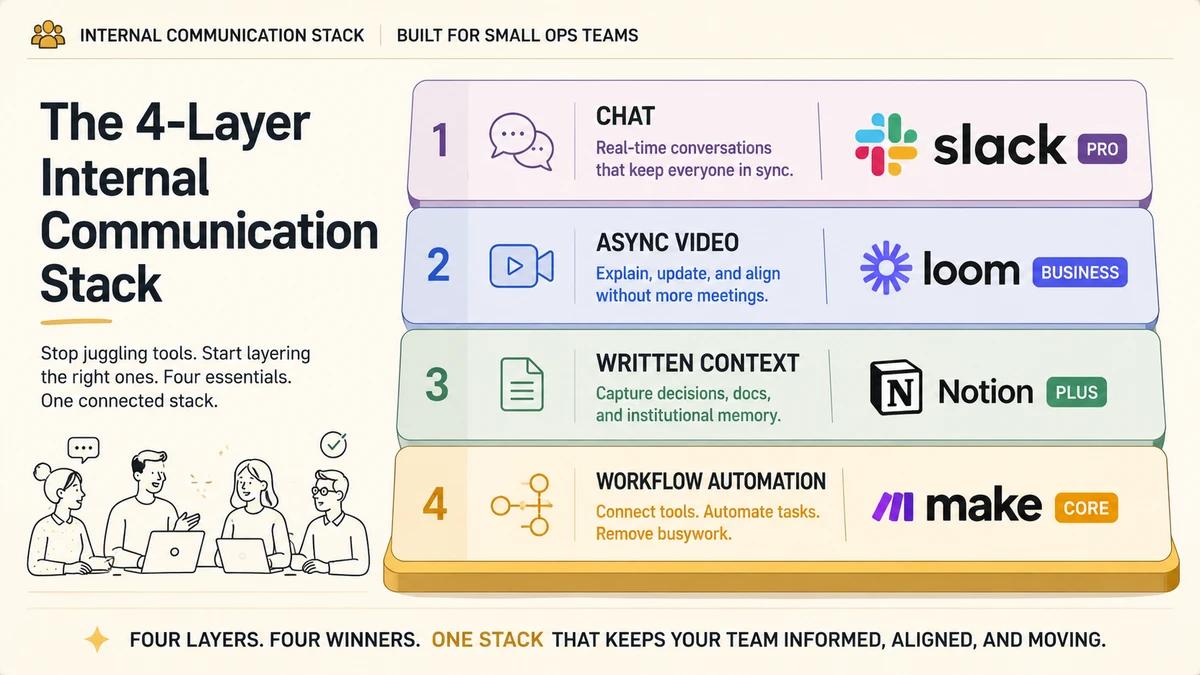
The fix is a 4-layer stack of automation tools that catch the four kinds of context a chat-only setup loses. Chat for what is happening right now (Slack Pro). Async video for screen-share-only calls (Loom Business). Written context for decisions worth keeping (Notion Plus). Workflow automation for turning a chat message into an ops action (Make Core). This article walks through each layer with verdicts, costs, and a worked example that ties the four together at around $2,223 a year for 5 seats.
Top recommendation overall: Make for the workflow-automation tier.
Make sits underneath the rest of the stack and turns a Slack message into a real action in another tool. Per-operation pricing scales better than Zapier's task model for a team that will grow scenario count over time, and native branching keeps multi-step automations readable. Zapier is the second pick when integration coverage matters more than cost-efficiency.
Prices in this article are USD annual-billed monthly equivalents from each vendor pricing page at last review. Live pricing may have changed since publication. Regional pricing, currency conversion, post-tax rates, promotional discounts, and free-tier credits can shift the actual cost shown at signup. Confirm against the vendor pricing page before purchasing.
Slack Pro at $7.25/seat/month annual, Loom Business at $18/seat/month, Notion Plus at ~$10/seat/month, Make Core at $9/month annual ($10.59 monthly) for one shared automation account. ~$37 per person per month for a 5-person team.
Why a Stack Beats a Single Tool
A 5-person team loses four kinds of context across the week, and each one needs a different kind of permanence. Trying to keep all four inside Slack collapses three of them into the chat thread, which is where context goes to die.
- Real-time context: what is happening right now. Chat solves this.
- Tone and demonstration context: what does this look like, what was the founder's actual expression on the screen. Async video solves this.
- Durable decision context: what did we decide three weeks ago, and why. A written-context layer solves this.
- Action context: when the message says "do X," who or what actually does X. Workflow automation solves this.
When a team's only memory is the Slack history search, the team has a chat log instead of a comms stack. Each tool earns a place by catching a kind of context the others lose.
Layer 1: Real-Time Chat (Slack Pro Wins)
Best for: real-time team comms with the broadest integration ecosystem.
Slack Pro is the default for one reason that overrides every other comparison: every other tool in this stack treats Slack as a first-class integration target. Loom posts recordings into Slack. Notion mirrors page changes back into a chosen channel. Make and Zapier both ship full Slack trigger and action libraries. The ecosystem is built around Slack, and a small team gets pulled along by that gravity.
The Pro plan at $7.25 per seat per month annual is the right tier for 5 people. It unlocks unlimited integrations, full message history, and Workflow Builder. Free tier loses message history at 90 days and caps integrations, which breaks every layered use case below.
What Workflow Builder is for
Workflow Builder handles the automations that live entirely inside Slack. Use it for request intake forms in a channel, onboarding sequences for new hires, scheduled stand-up prompts, and message-reaction triggers that route a request to the right person.
Workflow Builder stops at the Slack boundary. The moment an automation needs to write to Notion, create a row in a CRM, or trigger an action in another system, the work moves to the workflow-automation layer. Workflow Builder pairs with Make and Zapier, it does not replace them.
Where positioning context matters
Two alternatives stay relevant for specific team shapes. Twist is the async-first chat tool for teams distributed across four or more time zones who actively want to disable real-time pressure. Discord wins for community-style ops teams in gaming, creator-economy, and open source where voice channels matter more than threading. For most 5-person ops teams, Slack stays the pick.
API and MCP: Web API with OAuth 2.0 bot/user tokens (xoxb-, xoxp-). Slack ships an official MCP server (generally available) plus community implementations like korotovsky/slack-mcp-server. Search messages, send messages, manage canvases, and list users from any chat surface.
- Workflow Builder ships in-Slack automations without a separate tool
- Every other tool in this stack integrates with Slack as a first-class citizen
- Pro tier unlocks unlimited integrations and full message history at $7.25 per seat per month annual
- Channel-based mental model matches how ops teams already think about work
- Free tier loses message history at 90 days and caps integrations
- Real-time-by-default culture pressures asynchronous teams
- Workflow Builder cannot leave the Slack boundary on its own
- Search degrades fast on busy channels with thread-heavy use
Score: 4.5 / 5
Layer 2: Async Video (Loom Business Wins)
Best for: context-heavy updates that would otherwise become meetings.
Loom Business is the highest hours-saved-per-dollar tool in the stack. It replaces the calls that exist only because someone needs to see a screen. A founder explaining a strategic shift without a 30-minute all-hands. An ops lead walking through a new SOP with the screen in the recording. A customer call recap the rest of the team can watch at 2x.
Loom Business at $18 per seat per month annual unlocks unlimited recording length, AI-generated transcripts, and viewer engagement insights. Viewers stay free, so the cost scales by recorders rather than the audience. The Starter free tier with 25 videos and a 5-minute cap works for one or two people but breaks for a 5-person team within a quarter.
The math earns the line item. If Loom replaces two 30-minute synchronous meetings per person per week at a $40 per hour blended rate, the time saved clears the tool cost in the first month and keeps clearing it every month after.
Loom has the highest hours-saved-per-dollar of any tool in the stack. A small team should adopt it first if the budget only stretches to one new tool.
API and MCP: Loom exposes the Record SDK and SCIM 2.0 for Enterprise user lifecycle, with no public REST API at the time of writing. Atlassian ticket LOOM-690 tracks an official MCP, currently open. Community MCPs (karbassi/mcp-loom, lyramakesmusic) wrap Loom's internal GraphQL and are fragile. The lack of a stable programmatic surface is real friction worth flagging for ops teams who want their async-video stack chat-driven.
- Replaces synchronous meetings that exist only to share a screen
- AI-generated transcripts make recordings searchable and scannable
- Free viewers keep the cost tied to recorders rather than audience size
- Slack and Notion integrations land recordings where the team already works
- Starter free tier breaks at 5 people quickly with the 25-video and 5-minute caps
- Recording quality depends on the recorder's habits, not the tool
- Public REST API is unavailable, limiting programmatic dictation pipelines
- Affiliate program is not currently public, so partner tracking is limited
Score: 4.5 / 5
Layer 3: Written Context (Notion Plus Wins)
Best for: durable decisions, SOPs, runbooks, and onboarding paths that outlive a chat thread.
Notion Plus is the durable layer where decisions, SOPs, runbooks, and onboarding paths live so the chat threads stay scannable. The rule of thumb: anything that someone might need to find again in three months belongs in Notion, not in a Slack message.
Notion's Slack integration auto-posts page changes to a chosen channel, which is the right primitive. Chat is the alert layer. Notion is the durable layer. The team scrolls Slack to see what is happening today and opens Notion to see what was decided last quarter.
Notion Plus tier handles a 5-person team comfortably at around $10 per seat per month annual. The Free tier covers individuals and tiny teams but caps page history and blocks the workspace-wide permissions that an ops team needs once contractors and external collaborators show up.
What goes in Notion and not in Slack
- Decision logs. Example: "We picked Make over Zapier because per-operation pricing gives us headroom for scenario growth."
- SOPs and runbooks for repeatable ops work.
- Onboarding paths for new hires, structured by week one, week two, and week four.
- Project briefs that need to outlive the chat thread that kicked them off.
API and MCP: REST API with internal integration tokens or OAuth 2.0 (3 req/sec average). Notion's official MCP server (makenotion/notion-mcp-server, hosted) plus community wrappers cover search, database queries, page management, and comments. This is the cleanest agent-ready written-context layer in the cluster.
- Durable decision layer that outlives chat threads
- Slack integration mirrors page changes into a chosen channel
- Templated databases make SOPs and runbooks repeatable
- Workspace-wide permissions handle contractor and external collaborator scenarios
- Free tier caps page history and blocks workspace-wide permissions
- Adoption depends on a team habit of writing decisions down
- AI features cost extra on the Plus tier and add to the per-seat price
- Affiliate program currently not active for partner tracking
Score: 4 / 5
Layer 4: Workflow Automation (Make Wins, Zapier Second)
Best for: triggering ops actions from a Slack message and routing work across tools without a meeting.
The workflow-automation layer is the connective tissue underneath the rest of the stack. A Slack message says "create the new client folder, add the kickoff template, and post the link in the channel." Make turns that one message into the three actions and the reply, with no human moving between tools.
Make Core at $9 per month on annual billing ($10.59 monthly) covers most 5-person team scenarios with a single shared automation account. Per-operation pricing scales better than Zapier's per-task model for a team that will grow scenario count from 5 to 30 over the next year. Native branching keeps multi-step scenarios readable. Error handlers can route a failed step to a notification channel without breaking the rest of the scenario.
Zapier earns the second pick when integration coverage decides. The Zapier app catalogue clears 5,000 connectors at the time of writing, which still beats Make's ~1,800. When a critical integration exists only in Zapier, the right move is to run both tools side by side on different scenarios, not to swap.
Why Make wins for Slack-triggered ops work
- Per-operation pricing scales better than per-task pricing for a team running 30+ Slack-triggered scenarios. The same operation count costs less on Make at the same monthly tier.
- Branching is native. When a Slack message tags one of three people, Make routes the action to one of three downstream modules in a single scenario. Zapier requires a Paths add-on that changes the pricing math.
- Error handling is granular. Make lets a builder define error routes per module without breaking the rest of the scenario, which matters when an automation runs against an external API that fails 1 percent of the time.
When to pick Zapier instead
- A critical integration exists in Zapier and not Make.
- The person building the automations is non-technical and prefers the gentler builder.
- The workflows are linear "when X, do Y" automations and will not grow into branching logic.
API and MCP: REST API with API tokens or OAuth. Make's official cloud-hosted MCP server (Streamable HTTP + SSE) turns any active Make scenario into an agent-callable tool. The 240 req/min Teams limit is the practical ceiling.
- Per-operation pricing scales for teams that grow scenario count over time
- Native branching, filters, and error handlers in a single scenario
- Slack trigger library covers messages, mentions, reactions, and channel events
- One shared automation account is sufficient for most 5-person teams
- Smaller app catalogue than Zapier (~1,800 vs 5,000+)
- Builder is more powerful but steeper to learn for non-technical operators
- Affiliate program is currently pending approval for AS partner tracking
- Operation limits require a Pro upgrade at high scenario count
Score: 4.5 / 5
Zapier API and MCP: Workflow API and SDK with OAuth 2.0. Zapier's official MCP server (mcp.zapier.com) exposes 9,000+ apps and 40,000+ actions, but calls are metered against task usage (each MCP call ~ 2 tasks). Costs compound fast at agent scale, which makes it the broadest and the most expensive MCP surface in the cluster.
- Largest app catalogue in the workflow-automation category
- Gentlest builder for non-technical operators
- Strong default for linear "when X, do Y" workflows
- Slack trigger and action library matches Make on the basics
- Per-task pricing scales worse than per-operation for branching workflows
- Native branching requires a Paths add-on that changes pricing math
- Error handling is less granular than Make's per-module model
- Affiliate program is currently pending approval for AS partner tracking
Score: 4 / 5
The Comparison
The internal comms stack at a glance.
| Criteria | Slack Pro | Loom Business | Notion Plus | Make CoreTop Pick | Zapier |
|---|---|---|---|---|---|
| Layer | Real-time chat | Async video | Written context | Workflow automation | Workflow automation |
| Best for | Real-time team comms | Context-heavy updates | Durable decisions and SOPs | Triggering ops actions from chat | Broadest integration coverage |
| Pricing model | Per seat | Per recorder seat | Per seat | Per operation | Per task |
| Entry tier (annual) | $7.25/seat/month | $18/seat/month | ~$10/seat/month | $9/month shared ($10.59 monthly) | $19.99/month shared |
| Public API | Yes (Web API) | SDK only | Yes (REST) | Yes (REST) | Workflow API + SDK |
| MCP support | Official + community | Community fragile | Official + community | Official hosted | Official hosted |
| Branching support | Workflow Builder (basic) | Not applicable | Not applicable | Native routes and filters | Paths add-on |
| Slack integration | Native | First-class | First-class | Full trigger library | Full trigger library |
| Score (out of 5) | 4.5 | 4.5 | 4 | 4.5 | 4 |
How to Choose Across the Four Layers
A small ops team picks the stack in the same order every time. The rule is to follow the layering rather than chase a single tool that promises to do all four jobs.
- 01Start with chat
If the team already runs on Slack, stay there and pay for Pro. The integration ecosystem makes everything else in the stack easier. Free tier breaks the layering inside three months once message history caps and integration limits hit.
- 02Add async video next
Loom Business clears its cost the fastest of any line item. Pick it before any of the layers below if budget is tight. Two replaced 30-minute meetings per person per week at a $40/hour blended rate cover the seat cost inside the first month.
- 03Add a written-context layer
Notion Plus catches the decisions that would otherwise scroll out of Slack. Without this layer, the team re-explains the same call every quarter. Migrate the five most-used team docs in first and run the Slack integration so page changes mirror back to the channel.
- 04Pick the workflow-automation tool last
Make is the default once the team knows which Slack messages keep becoming someone's afternoon. Build three Make scenarios first: form-fill from #ops-requests, Loom prompt on new-client requests, and a Notion page-creation step. Switch to Zapier only when a needed integration is missing from Make.
- 05Reassess every six months
Pricing on Slack and Loom changes, Make and Zapier ship trigger updates, and the team's scenario count grows. The reassessment trigger is when ops requests outgrow #ops-requests and need real SLA tracking. At that point, add Linear or Unthread for tickets and keep the four core layers in place.
Total Annual Cost for a 5-Person Team
The full stack lands around $2,223 per year for 5 seats, or roughly $37 per person per month. Enterprise internal-comms platforms (Staffbase, Workvivo, Simpplr) start at $3,000 to $15,000 per year and are sized for 50 to 150 person teams. A small ops team gets a better-fitting outcome at one-fifth the cost.
- Slack Pro × 5 seats: ~$435 per year on annual billing
- Loom Business × 5 seats: ~$1,080 per year on annual billing, viewers free
- Notion Plus × 5 seats: ~$600 per year on annual billing
- Make Core: ~$108 per year ($9/month annual; $10.59 monthly), one shared automation account
- Stack total: ~$2,223 per year, ~$37 per person per month
The instinct to fold async video into Slack huddles or written context into Slack canvases is the instinct that flattens the stack back into a chat log. Keep the layers separate even when consolidation looks tidy on paper.
How the Stack Works Together
A worked example shows the layering in motion. A request lands in #ops-requests and the four tools cooperate without anyone scheduling a meeting.
- Request lands in #ops-requests. Slack Workflow Builder catches the form submission and posts the structured payload into the channel.
- Workflow Builder calls a Make webhook with the form payload as the trigger.
- Make scenario branches on request type. A "new client" request needs a Notion page and a Loom recording. A "support follow-up" request needs only a Notion entry. Branching is one scenario, not three.
- When a Loom is required, Make posts a "record a Loom and reply in thread" prompt with a templated link. When a Notion page is required, Make creates a templated page from the form data and links back into the thread.
- Once the action completes, Make posts the artefact (Notion page URL, Loom recording link) back into the original thread so the channel keeps the audit trail.
- Notion's Slack integration mirrors any future page updates back to the channel so the team sees decision changes as they happen.
Total components to build: one Slack workflow, one Make scenario with two branches, one Notion template. Setup time runs under two hours for someone who has used Make once before.
When to Swap or Add
- Swap Slack for Twist when the team is fully distributed across four or more time zones and async-first is non-negotiable.
- Swap Loom for Vidyard or Claap when AI-generated meeting summaries matter more than asynchronous recording.
- Add a ticketing layer (Linear, Unthread) when ops requests outgrow #ops-requests and need SLA tracking.
- Promote Make to a paid Pro tier when scenario count crosses ~30 active automations or operation usage gets close to the Core cap.
- Add Zapier alongside Make when a critical integration exists only in Zapier. The two coexist on different scenarios.
The verdict
Internal communication for a 5-person ops team is a layering problem, not a tool-picking problem. Chat, async video, written context, and workflow automation each catch a kind of context the others lose, and the four together cost around $2,223 a year. Slack Pro covers real-time. Loom Business clears synchronous meetings the fastest. Notion Plus is the durable decision layer. Make routes Slack messages into ops actions, with Zapier as the broader-catalogue alternative when a critical integration is missing.
That stack is the operator answer to "every question becomes a meeting." The next move depends on which layer leaks the most context inside the team's current setup. The audit picks the layer, the priority fix, and the success signal that proves the fix held.
How This Article Fits the Series
This deep dive sits inside the broader Best Automation Tools for Small Businesses hub, which covers the full ops-team toolchain. The hub introduces the layered-stack idea and this article expands the comms layer.
For the productivity-tier complement to this stack, read the sibling guide on small-business productivity automation. Notion overlaps across both stacks because the written-context layer carries through.
For the AI side of the same toolchain, read small-business AI adoption. For the scaling story when the team grows past 5, see small-business scale automation.