
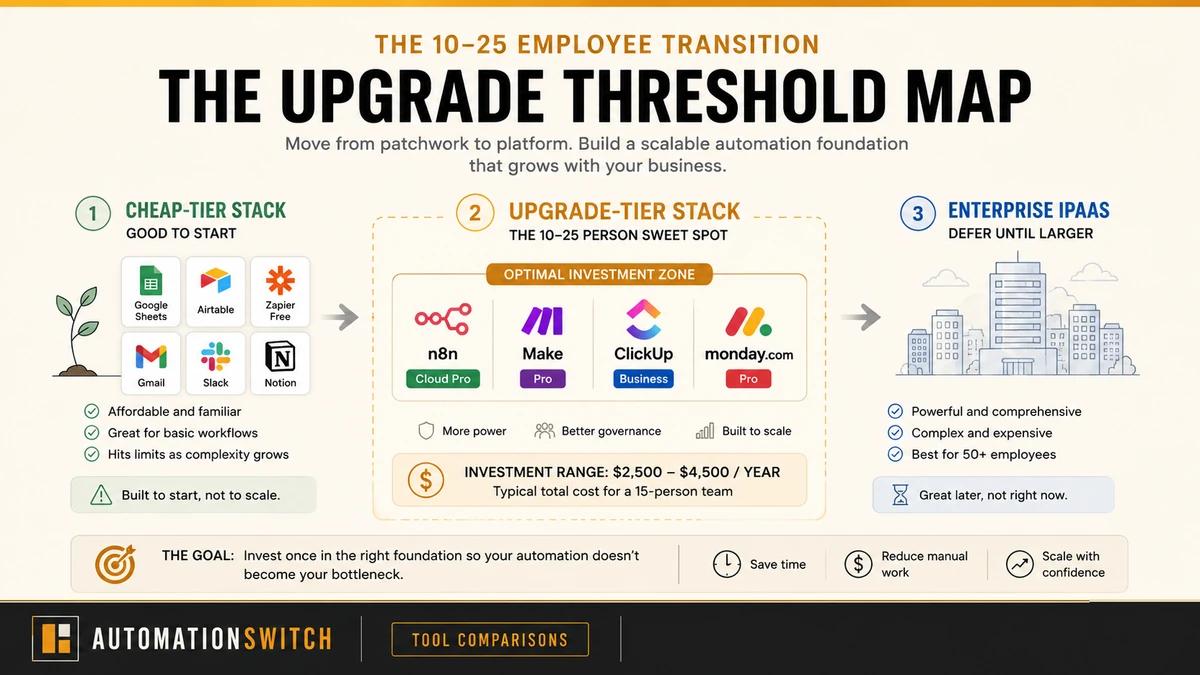
Your team hits fifteen members and the cheap-tier automation stack starts breaking under the weight. Last week your automation engineer rebuilt three Zaps at 10pm because credits ran out mid-launch, and three team members now run the company's most critical processes on five-dollar-a-month tools built for hobby workloads.
The fix is the upgrade-tier automation tool stack for the 10 to 25 employee band. Top pick: n8n Cloud Pro at $60 a month for 10,000 executions, paired with ClickUp Business or monday Pro for work management. Three-figure annual spend turns into a four-figure spend that holds up to growth, with the cost-of-ownership math worked through at fifteen people below.
Prices in this article are USD annual-billed monthly equivalents from each vendor pricing page at last review. Live pricing may have changed since publication. Regional pricing, currency conversion, post-tax rates, promotional discounts, and free-tier credits can shift the actual cost shown at signup. Confirm against the vendor pricing page before purchasing.
How We Picked These Tools
Six tools, one specific buyer, one band of growth. Every recommendation in this guide passes a single test: each tool must earn its keep at a specific execution-volume, team-size, or compliance trigger that is observable from inside a 10 to 25 person team.
That methodology produced a tight shortlist instead of a generic "best of." Three workflow-automation picks (n8n Cloud Pro, Make Pro, n8n self-hosted), two work-management picks (ClickUp Business, monday Pro), and two enterprise iPaaS tools we name only to anchor the price band you are deferring (Workato, Tray.io).
Each tool gets a concrete threshold trigger. Examples: upgrade to n8n Cloud Pro when your engineer's monthly self-hosting maintenance exceeds the $60 monthly fee. Upgrade ClickUp Free to Business when the 250-action automation cap fires consistently. Switch monday Standard to Pro when daily-fire automations across 10 people consume 300 actions per month against the Standard tier's 250 ceiling.
Pricing is dated implicitly via the source list at the foot of the article. Refresh cycles are six months because vendor pricing and governance features move that often.
What Changes at 10 People
Three things break in the cheap-tier stack between 8 and 15 employees, and they break in the same order every time.
- Execution volume crosses the cheap-tier ceiling. Free Zapier caps at 100 tasks per month. Make Free caps at 1,000 credits. ClickUp Free runs out of automation hooks. The first cliff is volume, and it arrives without warning because every team meters their automations only after the volume cliff hits.
- Governance starts mattering. At 3 employees, "share the password" is the access model. At 15, an audit trail, role-based access control, and SSO start to matter to your buyers, your insurance underwriter, and to whichever employee gets phished first.
- Workflow complexity overshoots free-tier features. Multi-step branching, custom logic, and version control are paid features in every workflow tool. Below 10 people, the workarounds are tolerable. Above 10, every workaround compounds because more people are touching it.
The signal you have hit the cliff: your operator has a Notion document called "Why this Zap broke last Thursday." That document is the audit log your governance layer is missing.
The Upgrade-Tier Stack at a Glance
Lead with the verdict. The shortlist for 10 to 25 people is two stacks side by side: the workflow tier (n8n Cloud Pro or self-hosted, with Make Pro as the visual-builder alternative) and the work-management tier (ClickUp Business or monday Pro). The comparison table below shows the upgrade-tier prices, included volume, governance features, and the threshold trigger that activates the spend.
| Criteria | n8n Cloud ProTop Pick | Make Pro | n8n self-hosted | ClickUp Business | monday Pro |
|---|---|---|---|---|---|
| Monthly cost | $60 | $16 | $5 to $20 server | $12 per user | $19 per seat |
| Annual cost at 15 people | $720 | $192 | $240 plus engineer time | $2,160 | $3,420 |
| Included volume | 10,000 executions | 10,000 credits | Unlimited | 25,000 actions per month | 25,000 automations + 25,000 integrations |
| Governance features | Unlimited users, integrations | Standard | None included (DIY) | Google SSO, advanced permissions | Private boards, time tracking, granular admin |
| Trigger to upgrade | Self-hosting overhead exceeds $60 per month | Free or Core credit cap consistently hit | One engineer can own ops, data residency required | Standard 250-action cap fires; need workload mgmt | Standard 250-action cap hit (typical at 8 to 10 people) |
| Public API | Yes (REST) | Yes (REST) | Yes (REST) | Yes (REST + webhooks) | Yes (GraphQL) |
| MCP support | Native MCP node | Official hosted | Native MCP node | Community only | Official + community |
| Best for | Ops teams that want managed reliability | Teams that prefer visual builders at scale | Teams with one engineer who can operate it | Teams that need depth and customisation | Teams that want visual UX and fast onboarding |
monday Standard's 250 automations per month sound like a lot until you do the math: one daily-fire automation across 10 people uses 300 actions per month. The Standard-to-Pro jump is a 100x increase. The Pro tier is priced for teams that hit this ceiling.
n8n Cloud Pro: The Top Pick for Managed Reliability
Pricing: $60 per month for 10,000 executions. Annual at one workspace: $720.
Best for: Ops teams that want managed n8n without the DIY infrastructure tax. Earns its keep when self-hosting maintenance time exceeds the $60 monthly fee, which is common by the second outage an engineer would have spent a Saturday fixing.
n8n's pricing model rewards understanding of execution volume. Cloud Pro is the threshold layer between scrappy self-hosting and the much steeper Cloud Business tier (€800 per month for 40,000 executions, roughly a 13x price jump). For most 10 to 25 person teams, Cloud Pro is the right plan because it buys back the engineer hours that self-hosted n8n quietly consumes every weekend.
The decision splits on engineering capacity. Self-hosting fits solo operators with infrastructure control, or teams with a willing engineer to own ongoing maintenance. Cloud Pro earns its keep when an engineer's monthly n8n maintenance hours cost more than $60 of opportunity time, which is common at 5 to 10 person teams running n8n at production volume.
Cloud Business earns its keep only when SSO or audit certification becomes a customer-blocking requirement. Specifically: SSO, Git-based version control, and multi-environment deployment trigger the jump.
API and MCP: REST API with X-N8N-API-KEY auth, scoped on Enterprise. n8n exposes any workflow as an MCP tool via its built-in MCP Server Trigger node, plus an MCP Client Tool node for consuming external MCP servers. n8n is the only workflow tool in this cluster that can both expose and consume MCP from the same instance.
- Managed reliability without the DIY ops tax
- 10,000 monthly executions covers most 10 to 25 person teams
- Unlimited users and integrations included
- Predictable upgrade path to Business when SSO or Git versioning becomes a customer requirement
- Cloud Business price jump is steep (roughly 13x Pro pricing)
- SSO arrives at the Business tier; buyer security questionnaires push the upgrade
- Execution metering rewards careful workflow design
- Self-hosting alternative is cheaper if an engineer can own it
Score: 4.5 / 5. Top pick of the workflow tier for managed reliability at the 10 to 25 person band.
n8n pricing tiers
Source-available, run it yourself
- ✓Unlimited workflows
- ✓Unlimited executions
- ✓Source-available licence
- ✓SSO and governance arrive at paid Cloud tiers
Top pick at 10 to 25 people
- ✓10,000 executions per month
- ✓Unlimited active workflows
- ✓Unlimited users and integrations
- ✓SSO arrives at the Business tier
Compliance trigger only
- ✓40,000 executions per month
- ✓SSO
- ✓Git-based version control
- ✓Multi-environment deployment
Make Pro: The Visual-Builder Alternative
Pricing: $16 per month for 10,000 credits, billed annually. Annual: $192.
Best for: Teams that want visual workflow building at scale. Earns its keep when the team's first credit cap is hit on the Free or Core plan, which usually shows up during a launch when scenarios suddenly need rebuilding at 10pm.
Make's credit model rewards understanding of operations-per-scenario rather than total scenarios. Most teams overestimate executions and underestimate operations. Pro adds priority execution and full-text search on top of the credit allocation, which is the upgrade that quietly preserves the operator's sanity during high-volume weeks.
The Teams plan ($29 per month for 10,000 credits, billed annually) earns its keep when three or more people are building scenarios. Teams adds shared templates and per-team scenario folders. The price difference vs Pro is small; the collaboration win is large at 10 to 25 people because more than one person is now building automations.
Make Enterprise (custom, sales-quoted) adds SSO, SAML, audit logs, RBAC, custom credit allocation, and a 24/7 SLA. Earns its keep at the compliance trigger or when a single workflow exceeds the standard credit ceiling. Most teams in the 10 to 25 band can defer Make Enterprise until customer compliance triggers it. Teams that ship to enterprise customers and get hit with a vendor security questionnaire start needing it.
Make's Enterprise tier is priced for buyers who sell to enterprises. Make Enterprise earns its keep the day customers start asking for your SOC 2 report.
API and MCP: REST API with API tokens or OAuth (240 req/min on Teams). Make's official cloud-hosted MCP server (Streamable HTTP plus SSE) turns active scenarios into agent-callable tools at no extra integration cost.
- Cheapest entry into a credible upgrade-tier workflow plan
- Visual builder is friendlier than node graphs for non-technical operators
- Priority execution preserves uptime during launches
- Teams plan is a soft, cheap collaboration upgrade when a second builder joins
- Credit model needs careful planning because operations per scenario surprise teams
- Enterprise tier pricing is opaque and sales-led
- SSO arrives at the Enterprise tier
- Free-to-Pro jump catches teams that miss the credit-usage signal
Score: 4 / 5. Strong runner-up for teams that prefer visual building over node graphs.
Make pricing tiers
- ✓10,000 credits per month
- ✓Unlimited active scenarios
Recommended for ops leads
- ✓10,000 credits per month
- ✓Priority execution
- ✓Full-text search
- ✓10,000 credits per month
- ✓Shared templates
- ✓Per-team scenario folders
n8n Self-Hosted: The Engineer-Led Alternative
Pricing: free software. $5 to $20 per month for a server. Annual at $20 VPS: $240 plus engineer time.
Best for: Teams with one engineer who can own infrastructure, plus a data residency or compliance requirement that pushes hosted Cloud out of bounds. Earns its keep when the engineering team has the capacity for ongoing maintenance and the monthly Cloud Pro fee feels heavy.
Self-hosted n8n is the cheapest credible workflow stack at this band, with one caveat: the cost shows up in engineer time rather than the line-item budget. Every Sunday upgrade, every plugin breakage, every scaling decision becomes engineering work. That trade is fine for some teams and a bad deal for others.
The decision tree is short. Pick self-hosted when you have a strong reason to control the infrastructure (data residency, compliance, regulated industry) and a willing engineer. Pick n8n Cloud Pro when the team's engineering hours are worth more than $60 per month spent on someone else's upgrades.
API and MCP: same REST API and MCP node coverage as n8n Cloud, but self-hosted. The trade-off is full control over rate limits, infrastructure cost, and data residency, paid in DevOps time.
- Cheapest credible workflow stack at this band
- Unlimited executions on your own infrastructure
- Data residency and compliance control
- Source-available licence keeps your build options open
- Maintenance is a recurring engineer cost (tracked, not billed)
- SSO and governance features arrive at paid Cloud tiers
- Plugin and version upgrades are your problem
- The $480 annual saving over Cloud Pro is small once engineer time is priced in
Score: 3.5 / 5. Strong fit for engineering-led teams, weaker for ops-led teams.
ClickUp Business vs monday Pro: The PM Layer Verdict
The work-management decision at 10 to 25 people sits above the free-tier line and below the enterprise tier. Both ClickUp Business and monday Pro are credible. The verdict depends on team character: ClickUp Business wins on cost-per-feature and depth. monday Pro wins on visual clarity and onboarding speed.
| Criteria | ClickUp Business | monday Pro |
|---|---|---|
| Per-seat cost (annual) | $12 per user | $19 per seat |
| Annual cost at 15 seats | $2,160 | $3,420 |
| Automation volume | 25,000 actions per month | 25,000 automations + 25,000 integrations |
| Governance | Google SSO, advanced permissions | Private boards, time tracking, granular admin |
| Customisation depth | Deep, wins for ops teams that build custom views | Less customisable, visually cleaner |
| Onboarding speed | Steeper learning curve | Faster ramp for non-technical staff |
| Best for | Operators who want depth and configurable workflows | Operators who want visual UX and Gantt-style planning |
At 15 employees the annual differential between ClickUp Business and monday Pro is roughly $1,260. The cost difference is real but recoverable in the first month of correctly-priced workflow tooling. Pick on team character, not on price alone.
ClickUp Business
Pricing: $12 per user per month (annual). 25,000 automation actions per month.
Best for: Teams that need depth and customisation at the upgrade tier. Earns its keep when ClickUp Free's automation hooks have run out and the team needs Google SSO plus workload management to keep operators sane.
ClickUp Business wins on cost-per-feature for teams whose operators want depth. The Standard-to-Business jump from 250 actions to 25,000 actions per month is the largest automation-volume step in the work-management category, and the $12 per user price is the lowest entry into a credible upgrade-tier work-management plan.
API and MCP: REST plus webhooks, with up to 1,000 req/min on Business Plus. MCP coverage is community-only, with implementations from taazkareem, Nazruden, hauptsacheNet, and six others covering tasks, lists, comments, and time tracking. The community-only posture is worth flagging at the upgrade-tier price.
- Cheapest credible upgrade-tier work-management plan
- Massive automation-volume jump from Standard to Business (100x)
- Google SSO and advanced permissions included
- Workload management and time tracking native
- Steeper learning curve than monday Pro
- UI density is higher (some operators find this overwhelming)
- Customisation depth means more configuration time up front
- Onboarding takes longer for non-technical teammates
Score: 4.5 / 5. Wins on cost-per-feature and configurability for ops-led teams.
ClickUp pricing tiers
- ✓Unlimited integrations
- ✓1,000 automation actions per month
Top pick for ops-led teams
- ✓25,000 automation actions per month
- ✓Google SSO and advanced permissions
- ✓Workload management
- ✓Time tracking
- ✓100,000 automation actions per month
- ✓Custom roles and permissions
monday Pro
Pricing: $19 per seat per month (annual, 3-seat minimum). 25,000 automations and 25,000 integrations per month.
Best for: Teams that want visual workflow building at scale. Earns its keep when monday Standard's 250 automations per month run out, typically by the time the team hits 8 to 10 people running a daily-fire automation.
monday Pro wins for teams whose operators want simplicity and visual clarity. Gantt charts, dashboards, and board views earn their keep at this band when non-technical staff need to read the same workflow status the operator is reading.
The Standard-to-Pro automation jump from 250 to 25,000 actions per month is a 100x increase, mirroring the ClickUp upgrade. Standard lasts under a quarter on any real 10-person team, which is why the upgrade trigger is observable rather than aspirational.
API and MCP: GraphQL with personal API keys or OAuth 2.0, complexity-based rate limits. monday ships an official vendor-maintained MCP server (mondaycom/mcp) plus a community alternative, available across all plans. Cleanest agent-ready PM at this price band.
- Cleanest visual UX in the work-management category
- Faster onboarding for non-technical staff
- Gantt, dashboards, and board views feel native rather than bolted on
- 100x automation jump from Standard makes the upgrade earn its keep quickly
- ~58% more expensive than ClickUp Business per seat
- 3-seat minimum inflates the bill at the smallest end of the band
- Less customisable than ClickUp Business at the same tier
- Standard tier disqualifies itself for any 10-person team running daily automations
Score: 4 / 5. Wins on visual UX and onboarding for operators who prioritise clarity.
monday pricing tiers
- ✓250 automation actions per month
- ✓Timeline and calendar views
Top pick for visual-first ops
- ✓25,000 automations + 25,000 integrations per month
- ✓Private boards, time tracking
- ✓3-seat minimum
- ✓Enterprise-scale automations
- ✓Tailored onboarding
- ✓Advanced security and governance
Workato and Tray.io: Defer Until 50-Plus People
Workato and Tray.io are positioning context, not a recommendation in this guide. They appear here because operators are being pitched these tools by enterprise iPaaS sales teams during this exact growth phase, and naming the threshold matters.
Workato's base workspace starts around $10,000 per year. Mid-market deployments commonly land between $25,000 and $80,000 per year. Enterprise deployments routinely run $150,000 to $400,000. Tray.io enterprise typically runs $5,000 to $10,000 or more per month. At 15 employees, that spend cannibalises hiring budget for benefits the team cannot use yet.
The threshold for considering either tool: 50 or more employees, more than 10 mission-coupled integrations across enterprise systems like SAP, Workday, Salesforce or Netsuite, a hard compliance trigger such as SOC 2 Type II or HIPAA that the iPaaS vendor must certify, or a single integration that consistently exceeds 25,000 monthly executions and needs guaranteed throughput.
Plain verdict for the 10 to 25 band: n8n Cloud Pro plus ClickUp Business plus Make Pro covers about 95% of the workflow surface that mid-market iPaaS pitches address, at one-tenth the cost. Defer Workato and Tray.io until headcount or compliance forces the move.
API and MCP at the enterprise tier: Workato now markets itself as "the industry's first enterprise MCP platform" with identity-tracked audit logging across 700+ connectors. Tray.io ships an Agent Gateway with @trayai/mcp-setup. Both have governed MCP tooling that scales to 50+ engineering teams. For a 10 to 25 person operation, that governance overhead is the kind of cost the upgrade-tier stack avoids by design.
If You Are Pre-First-Hire, Read This Instead
This guide is for ops leads at 10 to 25 people whose cheap-tier automation stack is breaking. If you are a solo founder pre-first-hire and the question is "how do I delay hiring with $100 to $300 per month of tooling," start with the companion piece, Best Automation Tools for Scaling Without Hiring, which targets a different audience, a different price band, and a different problem entirely. The two articles cross-link deliberately so you land on the right one.
In plain language: that article tells you how to replace a first hire with a $100 to $300 monthly stack. This article tells you what to upgrade when the cheap stack is already in place and breaking under 15 people.
Total Cost of Ownership at 15 Employees
The math operators actually need. Three stacks, fifteen people, one year.
| Criteria | Cheap-tier (status quo, breaking) | Upgrade-tier (recommended)Top Pick | Self-hosted variant | Enterprise iPaaS (deferred) |
|---|---|---|---|---|
| Workflow automation | Make Free + DIY n8n VPS = $240 | n8n Cloud Pro = $720 | n8n self-hosted = $240 | Workato base = $10,000 plus |
| Secondary workflow tool | Free tier only | Make Pro = $192 | Make Pro = $192 | Often bundled into iPaaS spend |
| Work management | ClickUp Free or monday blocked at 2 seats | ClickUp Business = $2,160 | ClickUp Business = $2,160 | ClickUp Business or equivalent = $2,160 |
| Annual total | $240 plus operator overtime | $3,072 | $2,592 | $10,000 to $80,000 plus |
| Hidden cost | Operator nights and weekends rebuilding broken Zaps | Negligible at this band | Engineer 4 hours per month maintaining n8n | Procurement and onboarding cycle alone consumes operator capacity |
Swap ClickUp Business for monday Pro and the upgrade-tier annual moves from $3,072 to $4,332 (a $1,260 difference at 15 seats). That is the full upgrade-tier band: $2,500 to $4,500 per year depending on choices.
The upgrade-tier stack delivers the governance (SSO at Business tiers), the volume headroom (25,000 monthly actions across automation and workflow tools), and the multi-builder collaboration that the enterprise tier promises, at one-tenth of the cost.
How to Choose Between These Tools
Six tools, one buyer, four practical decisions. Sequence the upgrade in the order below to keep procurement digestible and to size each plan against observed volume rather than guesswork.
- 01Upgrade the work-management tool first
Pick ClickUp Business if your operators want depth, customisable views, and lower per-seat cost. Pick monday Pro if your operators prioritise visual UX, faster onboarding for non-technical staff, and Gantt-style planning. Trigger: ClickUp Free or monday Standard automation cap is firing consistently.
- 02Upgrade workflow automation second
Pick n8n Cloud Pro for managed reliability if your engineers' weekend hours are worth more than $60 per month. Pick n8n self-hosted if you have a willing engineer plus a data-residency or compliance reason to control the infrastructure. Pick Make Pro if your operators prefer visual building over node graphs. Trigger: free-tier credit or execution caps are firing during launches.
- 03Add governance features when compliance triggers them
SSO, SAML, audit logs, and RBAC earn their keep at the customer security questionnaire, the day they bump n8n Cloud Pro to Business or Make Pro to Enterprise.
- 04Skip enterprise iPaaS until 50-plus people or a real compliance trigger
The cost is rarely justifiable in the 10 to 25 band, and the procurement cycle alone consumes operator capacity. Defer Workato and Tray.io until headcount forces the conversation.
- 05Refresh the stack every six months
Vendor pricing and governance features move that often. The upgrade-tier band is the most actively repriced layer of the automation market right now.
The verdict
Four tools earn their keep at 10 to 25 people. The table below holds the verdict in one frame: who picks each tool, what it costs, what trigger fires the upgrade, and where the MCP support lands.
| Criteria | n8n Cloud ProTop Pick | Make Pro | ClickUp Business | monday Pro |
|---|---|---|---|---|
| Pick if | Ops want managed workflow reliability | Ops prefer visual building over node graphs | Ops want depth and configurable workflows | Ops want visual UX and Gantt-style planning |
| Monthly cost | $60 | $16 | $12 per user | $19 per seat |
| Annual at 15 people | $720 | $192 | $2,160 | $3,420 |
| Upgrade trigger | Self-hosting overhead exceeds $60/mo | Free or Core credit cap fires during launches | Standard 250-action cap fires consistently | Standard 250-action cap fires (typical at 8 to 10 people) |
| MCP support | Native MCP node | Official hosted | Community only | Official + community |
Until you reach 50-plus people, ten-plus mission-coupled enterprise integrations, or a hard SOC 2 / HIPAA trigger, the upgrade-tier stack covers about 95 percent of what mid-market iPaaS pitches address at one-tenth the cost. Refresh the stack every six months because the upgrade-tier band is the most actively repriced layer of the automation market.
Where This Article Sits in the Cluster
This is one of four spinoffs from the small-business automation hub, each targeting a different growth-phase question. Read this one for the upgrade-tier decision at 10 to 25 people. Read the productivity sibling next if your team built on the productivity stack and you are now scaling those workflows.
For first AI tool decisions at the small-team level, read Best Automation Tools for Small Business AI Adoption. For comms tooling and async patterns inside small teams, read Best Automation Tools for Small Business Internal Communication.
