
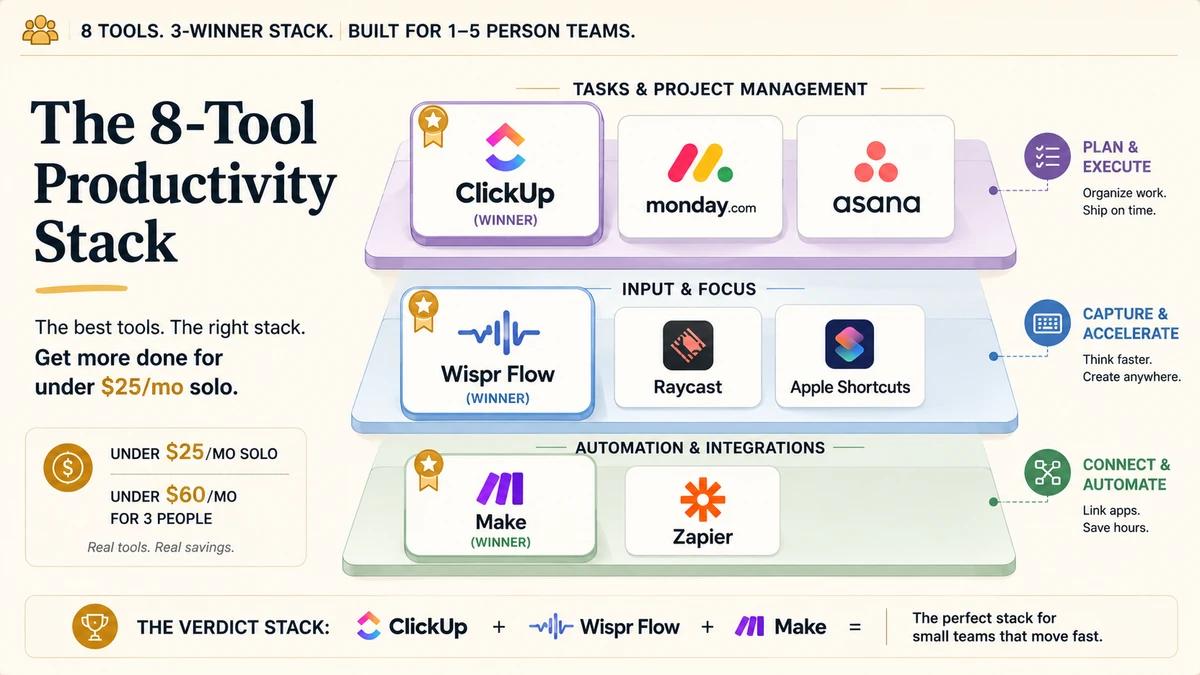
Most productivity automation tool roundups for small businesses rank by feature count. A solo founder reads ten of them, ends up paying for three seats on a tool with a 3-seat minimum to use one, and walks away with the same friction the article was supposed to remove.
The fix is segmenting before ranking. Team size, budget, and dictation volume decide the stack. The verdict for a 1 to 5 person team is ClickUp for tasks, Wispr Flow for input, Make for glue, in under $25 a month solo and under $60 a month for three people. This article scores eight productivity automation tools on the same axes and ships the swap rules for when each one earns its place.
ClickUp Free + Wispr Flow Pro ($12/mo annual) + Make Core ($9/mo annual) = ~$21/month solo. ~$60/month for a 3-person team. monday.com Standard alone for three seats is $432/year.
Prices in this article are USD annual-billed monthly equivalents from each vendor pricing page at last review. Live pricing may have changed since publication. Regional pricing, currency conversion, post-tax rates, promotional discounts, and free-tier credits can shift the actual cost shown at signup. Confirm against the vendor pricing page before purchasing.
How we picked these 8 tools
The shortlist comes from three filters: real budget compatibility for a 1 to 5 person team, real depth at that team size, and real evidence that the tool ships work without an engineering team behind it. SERP analysis, vendor pricing pages, Hacker News practitioner threads, and six-month founder write-ups all fed the criteria.
Each tool is scored on the same five criteria, on the same scale, so the comparison stays defensible.
- Cost at solo and 3-person volume, current pricing tier verified at vendor pages.
- Depth in the tool's primary job (tasks, dictation, glue, launcher, OS automation).
- Friction: time to first useful workflow without a setup engineer.
- Lock-in risk: how hard the tool is to leave once it owns your data.
- Practitioner signal: real founder voice, not vendor copy.
Disqualifications are stated up front. monday.com's 3-seat minimum disqualifies it for 1 to 2 person teams unless the team will genuinely scale to 3 within six months. Asana's paid plans require 2 seats, so true solo work on a budget falls out of scope. Zapier is priced for the volume Make covers at one fifth the cost, so Zapier earns a slot only when a specific integration forces the swap.
If your team is already 3 or more people, monday.com is back in play. If your team is 1 to 2, monday.com is a tax. The same logic applies to every other tool below: read the segmenting condition, then pick.
Productivity tools at a glance
Eight tools scored on the same axes. Cost values reflect the lowest paid tier at solo volume per the vendor pricing pages. Scores use a 1 to 5 scale with half-points so the comparison stays defensible across categories the tools do not directly share.
| Criteria | ClickUpTop Pick | monday.com | Asana | Wispr Flow | Raycast | Apple Shortcuts | Make | Zapier |
|---|---|---|---|---|---|---|---|---|
| Best for | Solo and 1-5 person teams | Teams of 3+ with visual board needs | Teams of 3-10 prioritising polish | Founders who draft heavily | Mac-only operators | iPhone-heavy zero-budget setups | Ops teams needing cheap glue | Teams needing integration breadth |
| Starting paid tier | $7/seat (Unlimited) | $9/seat × 3 seats min | $10.99/seat (Starter) | $12/mo (Pro) | $8/mo (Pro) | Free | $9/mo (Core) | $19.99/mo (Starter) |
| Free plan useful? | Yes, generous | Limited, 2-seat cap | Yes, 1-user only | Yes, 2,000 words/week | Yes, full launcher | Yes, fully free | Yes, 1,000 ops/mo | Yes, capped tasks/mo |
| Public API | Yes (REST) | Yes (GraphQL) | Yes (REST) | Closed beta | Extension SDK | CLI only | Yes (REST) | Workflow API + SDK |
| MCP support | Community only | Official + community | Official V2 GA | None known | MCP client / host | Community via CLI | Official hosted | Official hosted |
| Time to first workflow | 1 hour | 1 hour | 1 hour | 15 minutes | 10 minutes | 30 minutes | 2 hours | 1 hour |
| Score (out of 5) | 4.5 | 3.5 | 4 | 4.5 | 4 | 4 | 4 | 3.5 |
ClickUp: the top pick for tasks and docs
Best for: solo founders and 1 to 5 person teams who want one workspace covering tasks, docs, time tracking, and native automations.
The top pick goes to ClickUp for one specific reason: the free tier already runs a small business. Unlimited tasks, unlimited members, 100 native automations a month, docs, time tracking, and dashboards in one workspace. The Unlimited tier at $7 per seat per month annual unlocks Gantt views, advanced dashboards, and custom fields. ClickUp Brain (the AI add-on) sits at roughly $5 to $9 per seat per month and stays optional.
Reddit signal across r/clickup and r/Notion threads keeps repeating the same line: "the free version is very robust." A six-month founder write-up at The Business Dive ranked ClickUp ahead of monday.com on customisation and total feature surface, with the caveat that solo workers sometimes find the depth overwhelming. The fix is to keep features off until you need them. Start with tasks and docs. Add time tracking when invoicing pressure shows up. Add automations once the same email sequence runs three times by hand.
The honest critique: ClickUp's breadth is also its friction. The settings panel has more switches than any other tool in this roundup. The first hour costs more than monday.com's. The payback comes from never paying for a second tool to cover docs or time tracking.
API and MCP: REST plus webhooks API with personal tokens or OAuth 2.0, rate-limited per plan tier (100 req/min on Free, Unlimited, and Business; 1,000 on Business Plus; up to 10,000 on Enterprise). No official MCP server, with a thick layer of community MCPs (taazkareem, Nazruden, hauptsacheNet, plus six others) covering tasks, lists, comments, and time tracking. ClickUp is the most chat-drivable PM tool in this article even without a vendor MCP.
- Free plan covers a real solo workflow with 100 automations a month
- Unlimited tier at $7 per seat per month annual unlocks Gantt and dashboards
- One workspace replaces tasks, docs, time tracking, and basic automation
- ClickUp Brain stays optional, so the AI tax is opt-in
- Six-month founder reviews consistently rank it ahead of monday on customisation
- Settings depth steepens the first-hour learning curve
- Solo workers can over-configure before the workflow demands it
- Mobile experience trails the desktop interface
- Migrating off ClickUp once it owns your data takes real effort
Scores: Depth 4.5 / Cost 5 / Friction 4 / Practitioner signal 4.5
monday.com: the team-of-3 swap
Best for: teams of 3 or more who need a clean visual board view and faster onboarding than ClickUp.
The swap rule for monday.com is straightforward: if your team is already 3 people, monday is back in play. The 3-seat minimum stops being a tax once you have three operators. The Standard tier at $12 per seat per month annual unlocks automation and integrations. The visual board view is the cleanest in the category, and onboarding for non-technical operators runs faster than ClickUp's.
The deal-breaker for solo work is the seat-minimum economics. Three seats at the Basic tier is $9 per seat per month annual, which means $324 a year for software the solo founder uses one chair of. That same $324 buys ClickUp Unlimited for two seats and Wispr Flow Pro for the year, or it buys Make Core annual three times over. The math is unkind to solo work, and the math is exactly right at three seats.
When you hire your third operator, start on monday.com that day rather than migrating later. The migration tax from ClickUp to monday is real if you have already built dashboards and automations. Pay the seat tax once at the start, or pay the migration tax later. Pick one.
API and MCP: GraphQL API at api.monday.com/v2 with API tokens or OAuth 2.0 and complexity-based rate limits. monday.com ships a vendor-maintained MCP server (mondaycom/mcp, hosted) available across all plans, with a community option (sakce/mcp-server-monday) alongside it. That makes monday.com agent-ready out of the box.
- Cleanest visual board view in the category
- Fastest onboarding for non-technical operators
- Standard tier unlocks automation at $12 per seat per month annual
- Strong native integrations with Slack, Gmail, Google Drive
- 3-seat minimum disqualifies it for 1 to 2 person teams
- Costs more than ClickUp at the same coverage at solo volume
- Migration tax once the team is locked into a different tool
- AI features priced as a separate add-on rather than included
Scores: Depth 4 / Cost 2.5 / Friction 4.5 / Practitioner signal 4
Asana: the polish pick for 3-10 person teams
Best for: 3 to 10 person teams that prioritise polish, structured dependencies, and timeline view over feature breadth.
The case for Asana is calmness. The interface earns the praise. Defaults are sensible, the learning curve is shallower than ClickUp's, and the timeline view handles dependencies cleanly. The Starter tier at $10.99 per user per month annual is the sweet spot for a 3 to 10 person team that wants structure without configuration overhead.
The disqualification for solo work is the free-plan ceiling. Asana's free plan caps at 1 user on the paid feature set, which means a 2-person team already needs a paid subscription before any other tool gets onto the credit card. ClickUp covers the same surface area with both seats free. Asana is the calmer alternative at a higher price, and that price has to be worth more to your team than the alternatives below it.
Practitioner signal favours Asana for design-led and creative-led teams that already have polished tooling elsewhere. The friction comes from the harder ceiling on customisation: once the workflow grows past timeline-and-tasks into ops orchestration, the tool starts to push back.
API and MCP: REST API with personal access tokens or OAuth 2.0 (one-hour access tokens, separate read and write concurrency limits). Asana now ships an official V2 MCP server at mcp.asana.com/v2/mcp (generally available, OAuth-gated), with a healthy community ecosystem (roychri, rungtruong, ampcome-mcps) on top. That makes Asana the cleanest agent-ready integration in the PM cluster for AI-first stacks.
- Sensible defaults reduce time to first useful workflow
- Timeline view handles dependencies cleanly
- Starter tier at $10.99 per user per month annual is fairly priced for the polish
- Strong fit for design-led and creative-led teams
- Free plan caps at 1 user for the paid feature set
- Less customisation depth than ClickUp at the same price point
- Growth past timeline-and-tasks orchestration runs into ceilings
- Add-ons stack the cost faster than ClickUp does
Scores: Depth 4 / Cost 3 / Friction 4.5 / Practitioner signal 4
Wispr Flow: the input-layer dictation pick
Best for: any founder who drafts heavily across email, docs, chat, and project notes.
The dictation layer is the AS-defensible take in this roundup. Wispr Flow is a dictation app that types where your cursor is. The free Basic tier gives 2,000 words per week on desktop. Pro at $12 per month annual ($144 per year) unlocks unlimited words. Teams pricing covers shared seats at $10 per seat per month annual.
The practitioner signal is unusually strong for a tool this category-niche. Rahul Vohra of Superhuman called Wispr Flow "the best AI product since ChatGPT" on Hacker News. A practitioner write-up at zackproser.com benchmarked output at 184 words per minute (compared to ~90 typed), a 4x speed multiplier in real authoring conditions. The Hacker News thread on Wispr Flow ran with the kind of unpaid endorsement that vendor copy struggles to fake.
The honest caveat: Wispr Flow is cloud-based, with no offline mode. Operators with regulated data should evaluate local-only dictation alternatives before adopting; we cover those tools in a separate dictation comparison. Operators who write fewer than two hours per day across all surfaces should stay on the free 2,000 words per week tier and reassess after a month.
API and MCP: closed-beta API only. A developer portal exists at platform.wisprflow.ai with quickstart docs, with partnerships paused and access gated to enterprise contacts. No official MCP server, and no community MCP wrapper surfaced in primary research. Wispr Flow is intentionally a UX-layer tool for now, so programmatic dictation pipelines stay blocked unless a buyer has enterprise access.
- 4x typing-speed multiplier in real authoring conditions
- HN endorsement from Rahul Vohra of Superhuman
- $144 per year flat for unlimited words at solo volume
- Works in every text field on the desktop, not just a single editor
- Free tier covers 2,000 words per week for low-volume writers
- Cloud-based with no offline mode
- Mobile support trails the desktop experience
- Privacy-sensitive data needs a local fallback
- Pricing at solo volume is flat, not usage-based
Scores: Depth 4.5 / Cost 4 / Friction 5 / Practitioner signal 5
Raycast: the Mac-only launcher
Best for: Mac-only operators whose friction is mostly about app-switching and quick access.
The case for Raycast is desktop friction reduction at compounding scale. The free tier alone replaces 4 to 5 utility apps: clipboard history, snippets, window manager, calculator, calendar peek. The Pro tier at $8 per month annual adds Raycast AI across leading models (Claude, OpenAI, Perplexity), custom themes, and cross-device sync.
For a Mac-only operator, Raycast Pro pays back in the first week through the AI layer alone. Asking Claude or GPT-5 a quick question without leaving the launcher costs less context than alt-tabbing into a browser tab. Stack that on top of clipboard history and the window manager and the launcher earns its place.
The disqualification is the platform. Raycast is Mac-only. Cross-platform teams cannot standardise on it. Operators who run Windows or Linux get nothing from this section.
API and MCP: extension SDK rather than a public REST API; React and TypeScript extensions ship through the Raycast Store with local manifests. Raycast itself is an MCP client and host, with a built-in MCP Server Registry and stdio plus HTTP transport support, alongside community servers (ExpertVagabond/raycast-mcp-server, EvanZhouDev/mcp). Raycast is a category-defining MCP consumer on macOS rather than a service to expose.
- Free tier replaces 4 to 5 utility apps in one launcher
- Pro tier at $8 per month annual includes Raycast AI across leading models
- Compounding time savings for Mac-only operators
- Active extension ecosystem for custom workflows
- Mac-only platform support
- AI layer requires the Pro tier
- Power-user surface area takes a week to flatten the curve
- Limited value for Windows or Linux operators
Scores: Depth 3.5 / Cost 4 / Friction 4.5 / Practitioner signal 4
Apple Shortcuts: the iPhone zero-budget baseline
Best for: iPhone-heavy zero-budget setups where the phone is the primary work device.
The case for Apple Shortcuts is OS-level automation at zero cost. Triggers run on time, location, or device state. Actions chain across native apps and third-party apps with Shortcuts support. Logging an expense at a coffee shop, summarising daily tasks at 7am, kicking off a focus mode when a calendar block starts, all run on the phone with no cloud round trip.
Zapier's own roundup of iPhone automation ideas is a credible practitioner source on this. The patterns that pay back are time-based and location-based triggers, not feature-rich integrations. Apple Shortcuts is the free baseline for an iPhone-heavy operator before any cross-platform tool gets added.
The ceiling is breadth. Apple Shortcuts works inside the Apple ecosystem. Cross-platform automation needs Make or Zapier. Web hooks and HTTP requests are supported and feel like an afterthought next to a real workflow tool.
API and MCP: no public REST API. On macOS the shortcuts CLI is the programmatic entry point, with a healthy ecosystem of community MCPs (recursechat, somethingwithproof, supermemoryai/apple-mcp, dvcrn, artemnovichkov) wrapping it to list and run saved shortcuts. iPhone-heavy operators get less programmatic coverage, so any agentic Apple Shortcuts flow today bakes in macOS lock-in.
- Free, on-device, no cloud round trip
- Time-based and location-based triggers run reliably
- Native app integration depth is unmatched on iOS
- Zero ongoing cost
- Apple ecosystem only
- HTTP and webhook actions feel afterthought-grade
- Cross-platform automation surface is limited
- Workflow versioning and team sharing are weak
Scores: Depth 3 / Cost 5 / Friction 3.5 / Practitioner signal 3.5
Make: the glue layer at one-fifth the cost
Best for: ops teams that need real workflow logic and predictable cost at solo or small-team volume.
The glue layer in this roundup is Make. The free tier gives 1,000 operations per month with a 15-minute scheduling interval. Core at $9 per month annual unlocks 10,000 operations and a 1-minute interval. Pro and Teams tiers scale up from there. Make's scenario builder handles real branching logic, error handlers, and iterators that Zapier charges premium tiers for.
The cost case is the headline. Compare Make Core at $9 per month for 10,000 operations against Zapier's Starter tier at $19.99 per month for 750 tasks. At equivalent volume Make is roughly one fifth the cost, and the gap widens as workflows grow. A solopreneur stack write-up at f3fundit.com and a Make-vs-Zapier breakdown at soloscaletools.com both land on the same conclusion: Make wins on cost-per-operation at solo and small-team volume.
The honest cost: Make's scenario builder is more visual and more confusing on day one than Zapier's wizard. The first scenario takes 2 hours instead of 1. The payback is the bill at the end of the year.
API and MCP: REST API with API tokens or OAuth (1.0 and 2.0; 240 req/min on Teams). Make ships an official cloud-hosted MCP Server (Streamable HTTP plus SSE) that turns any active, on-demand scenario into an agent-callable tool, with third-party wrappers available alongside it. Make Pro users get an instant agentic surface across 3,000-plus apps without rebuilding integrations.
- $9 per month annual covers 10,000 operations on Core
- One fifth the cost of Zapier at equivalent volume
- Real branching logic, error handlers, and iterators at the Core tier
- Active integration library covering 1,000+ apps
- 1-minute scheduling interval on Core (vs 15 minutes on the free tier)
- Visual scenario builder is harder on day one than Zapier
- App catalogue is smaller than Zapier's 7,000+
- Some niche integrations only ship as community modules
- Operations-based pricing requires monitoring at scale
Scores: Depth 4.5 / Cost 4.5 / Friction 3 / Practitioner signal 4
Zapier: the breadth pick for niche integrations
Best for: teams without engineers who need an integration breadth Make does not cover.
The case for Zapier is breadth rather than price. The catalogue covers 7,000+ apps to Make's 1,000+. The wizard is the simplest in the category. The Starter tier at $19.99 per month annual covers 750 tasks. Higher tiers scale up the task budget faster than Make's operations budget.
The swap rule is narrow: use Zapier only for the one integration that Make does not support. Run everything else on Make and cap the Zapier task count at the lowest tier that covers the specific zap. The combined bill stays under $30 a month at solo volume.
The disqualification for high-volume use is the pricing model. At any meaningful scale, Zapier costs more than Make for the same workflow. Teams that build 20+ active zaps end up cross-shopping inside the first quarter.
API and MCP: Zapier Workflow API plus SDK with OAuth 2.0; the Workflow API is gated to developers with a published public integration, with the SDK broadly available for backend and agent calls. Zapier ships an official hosted MCP server at mcp.zapier.com (github.com/zapier/zapier-mcp) covering 30,000-plus actions across 9,000-plus apps, with community wrappers alongside. Zapier MCP calls are now metered against task usage (about 2 tasks per call), so agentic use can compound costs fast.
- 7,000+ app catalogue is the largest in the category
- Wizard-style builder is the simplest setup in the category
- Best-in-class for one-zap integrations on niche apps
- Strong template library for common automations
- Pricing punishes high-volume use compared to Make
- Task-based pricing at solo volume is roughly 5x Make's cost
- Real branching logic locked behind premium tiers
- Tasks-per-zap accounting can surprise growing teams
Scores: Depth 4 / Cost 2 / Friction 4.5 / Practitioner signal 3.5
How to choose: segmenting before ranking
The decision is segmenting, not ranking. Run the questions in order. The first one whose answer is clear picks the stack.
- 01Solo or 1-2 person team under $50/month budget
Pick ClickUp Free + Wispr Flow Pro + Make Core. Total cost lands at about $21 a month. ClickUp covers tasks and docs, Wispr Flow handles input speed, Make wires the workflow glue. Skip monday.com and Asana until the team grows.
- 02Team of 3+ with visual board needs
Swap monday.com Standard for ClickUp. Pay the seat-minimum tax once at hire-three rather than migrating later. Keep Wispr Flow and Make in the stack. ~$60/month for the three-person verdict stack.
- 03Team of 3-10 prioritising polish over feature breadth
Swap Asana Starter for ClickUp. The calmer interface earns its price for design-led and creative-led teams. Asana Starter at $10.99 per user per month annual is a fair price for the polish.
- 04Mac-only operator with app-switching friction
Add Raycast Pro to whichever core stack you have running. The launcher pays back in the first week through the AI layer alone. Stack clipboard history and window manager on top of the AI layer.
- 05iPhone-heavy founder with zero budget
Build the iPhone baseline on Apple Shortcuts before adding Make. Time-based and location-based triggers run reliably. Apple Shortcuts handles OS-level phone triggers free, Make handles cross-platform glue when the workflow needs it.
- 06Writer with more than two hours of drafting per day
Wispr Flow Pro is non-negotiable. The 4x typing speed multiplier pays back in 2 to 3 weeks of saved time. Pro at $144 per year flat is the right tier for any team with a real long-form writing habit.
- 07Specific integration only Zapier supports
Run that one zap on Zapier and keep everything else on Make. The combined bill stays under $30 a month at solo volume. Cap Zapier at the lowest tier that covers the specific integration.
Do not add a fourth tool until one of the first three breaks. Productivity stacks compound with discipline, not with tool count.
The verdict
Productivity automation tools fail when they get picked the same way for every team. Pick by segment, not feature count. This article scored eight tools on the same axes: ClickUp anchors the tasks layer, Wispr Flow earns the input layer with a 4x typing-speed multiplier, Make handles the glue layer at one fifth Zapier's cost, and the rest are swap-ins for specific team shapes (monday.com at 3+ seats, Asana for polish-first teams, Raycast on Mac, Apple Shortcuts on iPhone, Zapier for niche integrations).
Under $25 a month solo, under $60 a month for three people. The next move is which tool in the segmenting tree above attacks the bottleneck in your current stack. The audit picks the answer, the priority swap, and the success signal that proves the swap held.
Where this article sits in the cluster
This article expands the productivity layer of the broader small-business automation toolchain. Once the productivity stack is running, the next questions are routing internal communication and scaling the stack past 10 people. The companion AS roundups for those decisions are the internal communication roundup and the scaling-past-10-people roundup. For the AI side of the same toolchain, read the small-business AI adoption playbook.
This article contains an affiliate link to Wispr Flow. Automation Switch may earn a commission if you sign up through that link. The recommendation is editorial; affiliate status does not influence which tool ranks where in the article.
