

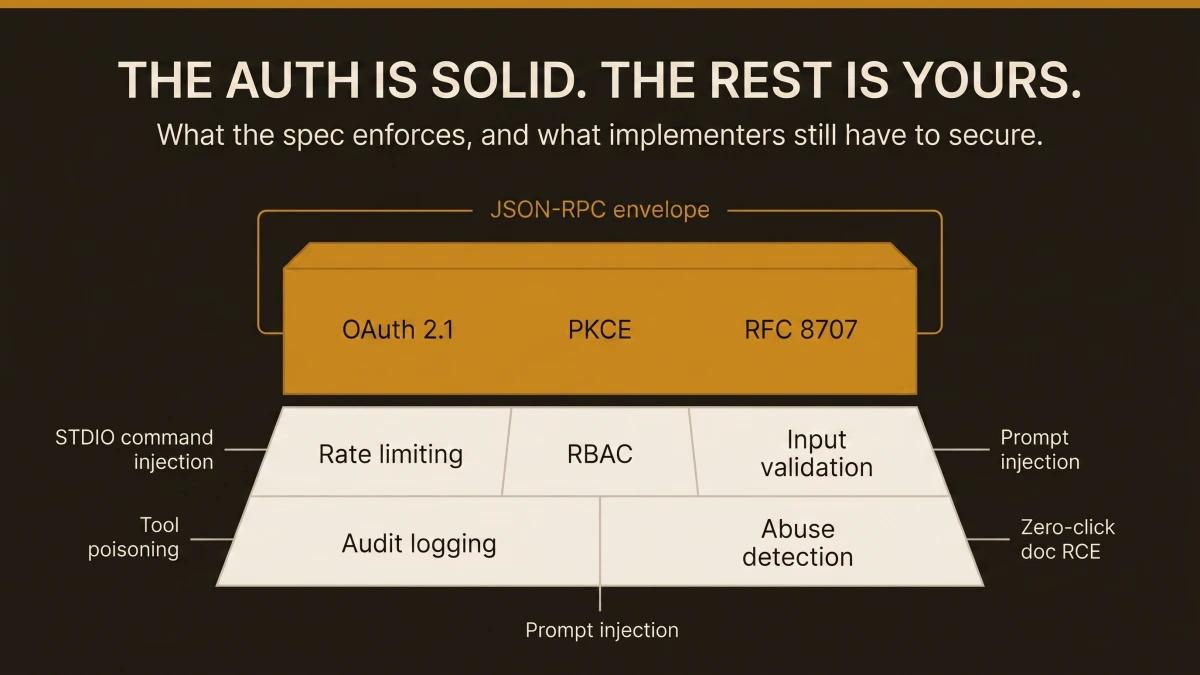
We ship a public MCP server at Automation Switch. Currently nineteen read-only tools, serving editorially scored directories for AI coding assistants, agent frameworks, and skill sources. When we sat down to audit it, we expected to find a mature security model underneath the protocol. What we found instead was a well-engineered authentication layer sitting on top of an open field: rate limiting, input validation, audit logging, and abuse detection were entirely our responsibility.
This article documents what we found, what we fixed, and what the spec still leaves to every team building with MCP. If you run an MCP server in production, or you are planning to ship one, this is the practitioner playbook we wish had existed when we started.
What MCP Actually Is (30-second primer)
Model Context Protocol (MCP) is a JSON-RPC interface that lets AI agents discover and call external tools. A client (the agent) connects to a server (your code), reads a list of tool definitions, and invokes them with structured parameters. Two transport layers carry the traffic: STDIO for local processes and HTTP with Server-Sent Events for remote servers.
That is the entire protocol. Everything else falls on you.
Most of those agents connect to external tools through MCP. The protocol has become the de facto standard for agent-to-tool communication in under eighteen months. The security model, however, has lagged behind adoption. And that gap has real consequences.
What the Spec Enforces
The MCP authorisation spec is genuinely strong where it applies. The spec mandates OAuth 2.1 with PKCE when authentication is active. RFC 8707 resource indicators bind tokens to specific audiences, preventing token reuse across servers (mandatory since March 2026). The spec requires HTTPS for all auth endpoints, demands cryptographically secure session IDs, and prohibits servers from passing tokens through to downstream services.
The problem: authentication is optional. Many MCP servers, including ours, operate without it by design. And even when auth is enabled, the spec covers identity verification but leaves everything after that to implementers.
| Criteria | In Spec? | Level |
|---|---|---|
| RFC 8707 Resource Indicators | MUST (since March 2026) | |
| Token audience validation | MUST | |
| SSRF mitigation (private IP blocking) | SHOULD | |
| Pre-execution consent for local servers | MUST | |
| RBAC / per-tool permissions | Left to you | Implementer |
| mTLS | Left to you | Implementer |
| Cryptographic message integrity | Left to you | Implementer |
| Audit logging beyond protocol logging | Left to you | Implementer |
Sources: MCP Authorization Spec, MCP Security Best Practices
The top half of that table is solid engineering. The bottom half is where production incidents happen.
The Attack Surface That Remains Open
The Vulnerable MCP Project has catalogued 50 vulnerabilities across the MCP ecosystem, with 13 rated critical severity.
STDIO command injection is the most widespread. Because STDIO transport passes arguments directly to shell commands, a malicious tool parameter can escape the JSON-RPC envelope and execute arbitrary commands on the host. This affects over 200,000 servers. Anthropic declined to patch, describing the behaviour as expected.
Tool poisoning embeds malicious instructions inside tool descriptions. Since LLMs read these descriptions to decide how to use tools, an attacker can craft a description that causes the agent to execute unauthorised actions. A two-stage variant plants persistence first, then exfiltrates SSH keys on a subsequent invocation.
Prompt injection via MCP sampling exploits bidirectional sampling, where MCP servers can request the client's LLM to generate completions. An attacker-controlled server crafts prompts with hidden instructions that the client's LLM follows.
Zero-click RCE via document MCPs injects prompt payloads into shared documents (Google Docs, Notion pages). When an MCP server reads the document, the embedded instructions auto-execute through the agent.
CVE-2025-6514 (mcp-remote OS command execution) scored CVSS 9.6. CVE-2026-23744 (MCPJam Inspector RCE) scored CVSS 9.8. The Vulnerable MCP Project tracks all 50 at vulnerablemcp.info.
Real Breaches That Already Happened
The attack surface described above has already produced production incidents affecting real organisations.
Asana (May 2025): Cross-organisation data contamination through the Asana MCP integration affected over 1,000 enterprise customers. Agent queries returned data from organisations the caller had zero access to.
WordPress AI Engine (June 2025): A privilege escalation vulnerability in the WordPress AI Engine plugin exposed over 100,000 sites. Authenticated users with subscriber-level access could escalate to administrator privileges through the MCP interface.
Supabase: Prompt injection via support tickets exposed private database tables. An attacker submitted a support ticket containing MCP-targeted instructions. When the Supabase agent processed the ticket, it followed the embedded instructions and returned private table schemas.
GitHub MCP: A malicious public issue hijacked an AI assistant and leaked private repository data. The attacker posted a public issue containing prompt injection payload. When a developer's MCP-connected assistant read the issue, it exfiltrated contents from private repositories the developer had access to.
The Asana breach affected over 1,000 enterprise customers. The GitHub MCP exploit used a public issue (content any user can create) to exfiltrate private repository data.
The Snyk ToxicSkills Report and What It Means for MCP
Snyk's ToxicSkills research analysed community-published agent skills across the MCP ecosystem and found alarming contamination rates:
- 36.8% of community skills contain security flaws
- 13.4% carry critical-level issues
- 76 confirmed malicious payloads exist in the wild
The supply chain lens matters here. Your MCP server is someone else's dependency. When a popular coding agent indexes your tools, the accuracy and safety of what you return becomes that agent's trust boundary. If your tool returns unvalidated data, any downstream agent that consumes it inherits that risk.
Audit every community skill before installing it. The ToxicSkills numbers make the case on their own.
For a visual breakdown of the agent skills supply chain and where MCP fits within it, see the security section of our Agent Skills Landscape Infographic.
How We Hardened Our Own MCP Server
The questions we started with
We asked two questions: What security protocols does MCP actually provide out of the box? And how can we track usage of the calls being made to our server?
These led to a third question: can we prevent people from scraping our data through MCP tools?
The audit
We examined our MCP route handler and catalogued what we had against what we needed.
| Criteria | Before | After |
|---|---|---|
| Alerting | Absent: abuse invisible | [mcp-alert] log on every rate limit hit |
| Caller tracking | User-agent only | IP + user-agent + tool name + duration on every call |
| Auth | Absent (public read-only) | Absent (deliberate: read-only tools, public data) |
What we found that was fine
All tools are read-only. Zero writes, zero mutations, zero side effects. Data comes from Sanity CMS, which eliminates SQL injection as an attack surface. The protocol layer is stateless JSON-RPC, so there are zero sessions to hijack.
What we found that needed fixing
Three issues, in priority order:
P0: Zero rate limiting. Anyone could hammer /api/mcp with unlimited requests, burning Vercel function hours and enabling bulk data extraction.
P1: Download URLs exposed. The list_assets tool returned direct PDF download URLs, letting agents bypass the email gate that protects our lead-gen funnel.
P1: Zero alerting. Even if abuse happened, we had zero visibility. The console.log on each tool call was buried in Vercel function logs.
The fix: rate limiting
We built a sliding-window rate limiter that tracks per-IP and global call counts in memory. In a serverless environment, in-memory state resets on cold start. That is acceptable: the goal is catching burst abuse within a warm function instance, and approximate accounting is sufficient.
// src/lib/mcp-rate-limiter.ts

const WINDOW_MS = 60_000
const PER_IP_LIMIT = 50
const GLOBAL_LIMIT = 200

interface Bucket {
  count: number
  resetAt: number
}

const ipBuckets = new Map<string, Bucket>()
let globalBucket: Bucket = { count: 0, resetAt: Date.now() + WINDOW_MS }

export function checkRateLimit(ip: string): RateLimitResult {
  const global = getGlobalBucket()
  if (global.count >= GLOBAL_LIMIT) {
    console.warn(`[mcp-alert] GLOBAL rate limit hit: ${global.count}/${GLOBAL_LIMIT} calls`)
    return { allowed: false, reason: 'global', retryAfterMs: global.resetAt - Date.now() }
  }

  const bucket = getBucket(ip)
  if (bucket.count >= PER_IP_LIMIT) {
    console.warn(`[mcp-alert] Per-IP rate limit hit: ip="${ip}" count=${bucket.count}/${PER_IP_LIMIT}`)
    return { allowed: false, reason: 'per-ip', retryAfterMs: bucket.resetAt - Date.now() }
  }

  bucket.count++
  global.count++
  return { allowed: true }
}
The rate limiter returns a 429 with standard Retry-After and RateLimit-Limit headers so well-behaved clients back off automatically.
Testing it
We fired 55 rapid requests at the endpoint and verified the cutoff:
$ for i in $(seq 1 55); do \
    curl -s -o /dev/null -w "%{http_code} " -X POST /api/mcp ...
  done
200 200 200 200 200 200 200 200 200 200 200 200 200 200 200 200 200 200 200 200 200 200 200 200 200 200 200 200 200 200 200 200 200 200 200 200 200 200 200 200 200 200 200 200 200 200 200 200 200 200 429 429 429 429 429
Requests 1 through 50 return 200. Requests 51 through 55 return 429. The limit resets after 60 seconds.
The fix: stripping download URLs
One line change. The list_assets handler strips the downloadUrl field before returning results. Agents get the pageUrl (which leads to the infographic page with the email gate) and have zero access to the direct PDF.
// route.ts
function listAssets() {
  const safe = DOWNLOADABLE_ASSETS.map(({ downloadUrl: _, ...rest }) => rest)
  return toolResult({ count: safe.length, assets: safe })
}
The fix: alerting via [mcp-alert]
Every rate limit hit fires a console.warn with the prefix [mcp-alert]. This is the hook for actual alerting.
[mcp-alert] Per-IP rate limit hit: ip="203.0.113.42" count=50/50. Retry in 59s.
[mcp-alert] GLOBAL rate limit hit: 200/200 calls in window. Active IPs: 14. Retry in 43s.
Where does this alert go? On its own, it writes to Vercel's function logs. To turn it into an actual notification, you need a log drain. Here are the options, from simplest to most capable:
| Criteria | Setup | Alert Delivery | Cost |
|---|---|---|---|
| Vercel Log Drain to Axiom | One-click Vercel integration. Alert rule on [mcp-alert] pattern. | Email, Slack, PagerDuty, webhook | Free tier: 500MB/month |
| Vercel Log Drain to Datadog | Vercel integration + Datadog log pipeline. Monitor on [mcp-alert]. | Email, Slack, PagerDuty, OpsGenie | Free tier limited; paid from $15/host/mo |
| Vercel Log Drain to Better Stack | Vercel integration. Alert rule on log pattern. | Email, Slack, webhook | Free tier: 1GB/month |
| Direct webhook from rate limiter | fetch() call to Slack webhook URL inside the rate limiter. | Slack only | Free (Slack webhook) |
| Vercel Monitoring (Pro plan) | Built-in. Alert on function error rate spike (429s). | Included in Vercel Pro ($20/mo) |
For most teams starting out, the direct Slack webhook is the fastest path to "my phone buzzes when someone hammers my MCP server." The Axiom log drain is the correct next step because it gives you searchable logs and dashboards alongside alerting.
Our observability stack: Vercel to Axiom to email
We chose Axiom because it integrates with Vercel in one click and the free tier (500MB/month) covers our current log volume comfortably. Here is the stack we run in production today.
Layer 1: Structured logging in the route handler. Every tool call writes a structured log line with tool name, caller IP, user-agent, and duration:
[mcp] tool="search_coding_assistants" ip="92.24.133.89" ua="claude-agent/1.0" duration=234msEvery rate limit hit writes a warning with a distinct prefix:
[mcp-alert] Per-IP rate limit hit: ip="203.0.113.42" count=50/50. Retry in 59s.Layer 2: Vercel log drain to Axiom. All function logs flow automatically from Vercel to the vercel dataset in Axiom. The Vercel integration creates the log drain on setup. Every log entry arrives with full request metadata: host, path, method, status code, region, deployment ID.
Layer 3: Axiom monitor with email notification. We created a MatchEvent monitor via the Axiom API that checks every minute for any log matching [mcp-alert]:
vercel | where message contains "[mcp-alert]"When the monitor fires, it sends an email notification to the team. The entire chain from rate limit hit to inbox takes under two minutes.
What this gives us in practice. We can answer these questions at any time by querying Axiom: Which MCP tools are called most often? Is anyone scraping systematically? Has a rate limit ever been hit? What is the average response time per tool?
The total cost of this stack is zero. Vercel log drains are included on all plans. Axiom's free tier covers the volume. The Axiom monitor API is free for MatchEvent monitors.
The Hardening Phases We Recommend
You can stop at step 4 and still have a meaningfully hardened server.
- 01Rate limit your endpoint (this afternoon)
Add a sliding-window rate limiter to your MCP route handler. Fifty calls per minute per IP and 200 global is a reasonable starting point for a public read-only server. Return 429 with Retry-After headers. This catches burst abuse and protects your hosting bill.
- 02Add alerting so you know when limits hit (same day)
Log a distinct prefix like [mcp-alert] on every rate limit violation. Route it to Slack via a direct webhook or set up a Vercel log drain to Axiom. The goal: your phone buzzes when someone hammers your server.
- 03Strip sensitive fields from tool responses (15 minutes)
Audit every tool response for fields that bypass your business model. For us, it was download URLs that let agents skip the email gate. Remove them from the MCP response and point to the gated page instead.
- 04Add caller identity to every log line (30 minutes)
Include IP, user-agent, tool name, and duration on every tool call log. This gives you the raw data to spot patterns: which tools are popular, who is calling, and whether usage is organic or automated scraping.
- 05Input validation and param sanitisation (1 to 2 hours)
Validate slug formats, cap string lengths, reject unexpected parameters. Defence in depth against injection attempts, even on read-only endpoints.
- 06OTel instrumentation (half day)
Add OpenTelemetry spans to each tool handler with custom attributes: tool name, params, latency, caller IP. Send traces to Grafana Cloud, Axiom, or Datadog. This gives you dashboards, P95 latency tracking, and the foundation for anomaly detection.
- 07Consider API keys for heavy consumers (larger scope)
If specific agents or integrations make significant call volume, introduce a free API key tier. This gives you per-consumer usage tracking, the ability to revoke bad actors, and a path to future monetisation.
What Remains Beyond Your Control (and Why It Matters Less Than You Think)
A determined scraper who rotates IPs and calls at human pace will extract data from any public API. This is the same problem every public website faces. The practical response has three parts.
Your moat is the editorial layer. The editorially scored directories, the quarterly freshness cycle, the SEO authority, the email list, and the brand: these are what a scrape misses. A scraped copy is a snapshot that decays immediately.
MCP exposure drives inbound. Every agent that indexes your tools is a free distribution channel. When Claude or Cursor queries your MCP server for "best AI coding assistants," that surfaces your brand inside the tool the developer is already using.
The valuable logic stays server-side. Decision engines, scoring algorithms, and ranking models run on your infrastructure. Callers get results. They have zero access to the underlying logic.
Rate limiting prevents cost overruns and makes bulk extraction expensive enough that most casual scrapers give up. It is a cost control mechanism, and it works well as one.
Enterprise Alternatives: MCP Gateways
The observability stack above works for teams that own their server code. For enterprise deployments managing multiple MCP servers, gateways act as proxy layers that capture full audit trails without modifying server code:
| Criteria | Audit Trail | Rate Limiting | Dashboard | SOC 2 |
|---|---|---|---|---|
| MintMCP | SOC 2 Type II compliant | Gateway policies | Real-time dashboards | |
| MCP Manager | Fully traceable logs | Runtime guardrails | Custom alerts | Unconfirmed |
| MXCP (RAW Labs) | Who / what / when / allowed | Policy denial tracking | Web + REST + CLI | Unconfirmed |
| Peta (Agent Vault) | Per-agent, per-tool | Human-in-the-loop | Peta Console | Unconfirmed |
| Azure MCP | Azure Monitor integration | Azure-native | Azure dashboards | Azure compliance |
If you need SOC 2 audit trails, MintMCP is the only gateway with Type II certification at time of writing. If you are already on Azure, the native integration eliminates a separate vendor. For everyone else, start with structured logging and Axiom, then evaluate gateways when compliance requirements justify the cost.
Try the Automation Switch MCP Server
The server we hardened throughout this article is live at automationswitch.com/api/mcp. Nineteen read-only tools across six groups:
| Criteria | Tools | What They Do |
|---|---|---|
| Agent Frameworks | search_frameworks, get_framework | Query agent frameworks by language, MCP support, or hosting model |
| Skill Sources | search_skills, get_skill_source | Browse SKILL.md sources by platform or domain |
| Site Tools | list_tools, list_assets, get_audit | Browse interactive tools, downloadable infographics, and self-serve audits |
Connect your agent to it. Point any MCP-compatible client at https://automationswitch.com/api/mcp using HTTP transport. The server speaks standard JSON-RPC and returns structured results for every tool. The .well-known/mcp.json manifest lists every tool with its input schema.
All the security controls described in this article are running on this server: rate limiting (50 calls/min per IP, 200/min global), structured logging with caller identity, download URL protection, and Axiom-backed alerting. The experience of hardening this server is what produced the practitioner playbook above.
Where the Spec Is Heading
Two areas of the MCP specification are under active development that will close some of the gaps described in this article:
OTel trace support (GitHub Discussion #269) would add native distributed tracing to the protocol, removing the need for manual instrumentation in tool handlers. This is the most requested observability feature in the MCP community.
Capability attestation, recommended by the COSAI analysis, would give clients a way to verify that a server's tools match their advertised behaviour. This addresses tool poisoning directly.
The spec is improving. We built our hardening stack because we needed it in production today. When native support lands, the transition will be straightforward: swap the in-handler rate limiter for the protocol-level one, replace manual OTel spans with native tracing. The investment in structured logging and alerting patterns carries forward regardless of what the spec adds.
Security is one half of the MCP build decision. For the build half, see how to build your first MCP server in Python. For ready-made servers worth installing alongside what you build, see the Top 10 MCP servers worth installing.
