
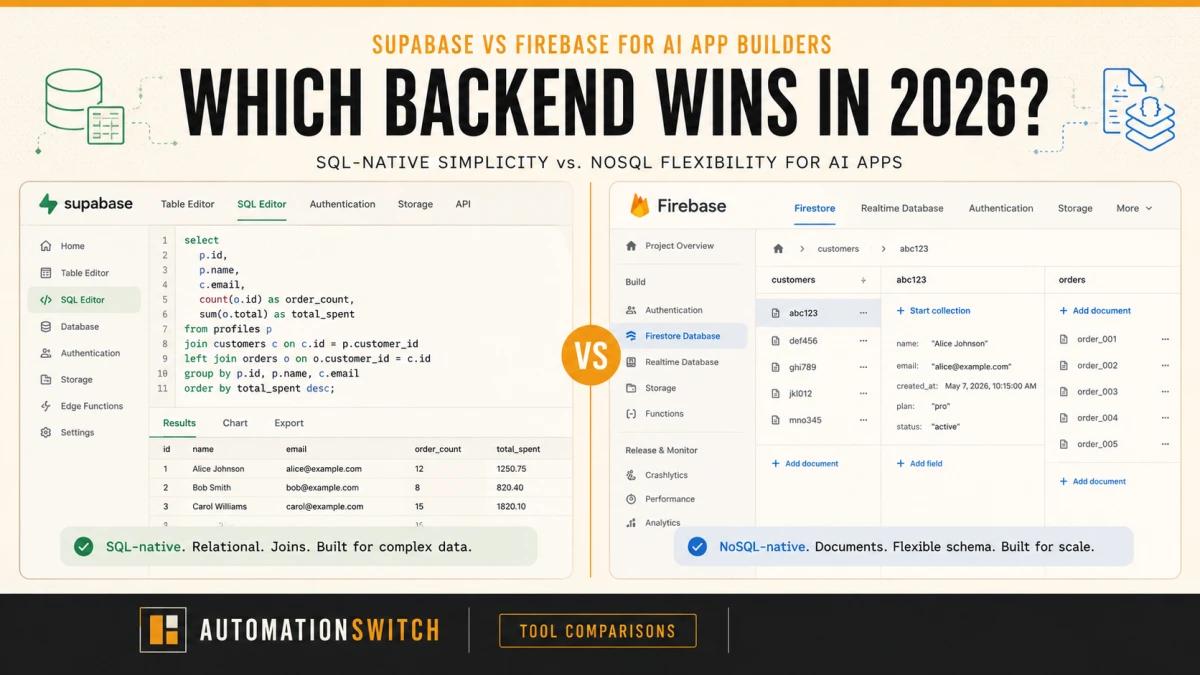
The backend decision used to be straightforward: Firebase for speed and real-time sync, Supabase if you wanted SQL and open-source. In 2026, a third variable changes the calculation entirely: your AI toolchain.
If you're building an AI app with Lovable, Bolt, Cursor, or any vibe coding tool, you need a backend that stores vectors natively, integrates with your LLM layer, and scales predictably as your usage grows. Most Supabase vs. Firebase articles were written for backend engineers making a deliberate architectural choice. This one is for founders and operators who are using AI tools to build AI products and need to pick the right foundation before they're too deep to switch.
The answer is not the same as it would have been eighteen months ago. Here's what changed, and what it means for your backend decision.
We build on Supabase. PrecisionReach, our agent runtime projects, and the Automation Switch website all run on Supabase's managed Postgres. We haven't used Firebase in production. This article reflects that experience honestly: deep Supabase knowledge from hands-on builds, and Firebase analysis drawn from documentation, community reports, and independent sources. We believe transparency strengthens the comparison rather than weakening it.
What Changed for AI App Builders
In early 2024, picking a backend meant choosing between developer velocity and data model flexibility. Firebase for fast prototyping. Supabase for teams that wanted SQL. That framing is now obsolete. A third variable now dominates the decision: your AI toolchain.
The category of "AI app" now means something specific. Apps that call LLM APIs, store user interaction history, retrieve context from a vector store, and surface results in a UI built by a vibe coding tool. Every one of those layers (the LLM calls, the embeddings storage, the relational queries) maps better to Supabase's architecture than Firebase's. This isn't coincidence. Vibe coding tools like Lovable and Bolt have defaulted to Supabase as their native backend not because of marketing partnerships but because the underlying data model fits.
The pivotal change is pgvector. Supabase ships with native PostgreSQL vector extension support, which means you can store embeddings and run semantic search in the same database as your application data. Firebase's NoSQL architecture (Firestore and Realtime Database) does not support vector search natively. Adding AI features to a Firebase app means adding a separate vector database. That's a second service to provision, maintain, pay for, and integrate. For most founders building AI apps with no-code tools, that's friction that kills momentum before launch.
Supabase: The AI-Native Backend
Best for: AI apps with RAG or semantic search, multi-tenant apps needing row-level access control, founders building with Lovable or Bolt who want generated code to work out of the box.
Supabase is a PostgreSQL database with a full product built around it: authentication, storage, edge functions, and real-time subscriptions. Everything runs on top of standard Postgres, which means the entire SQL ecosystem works natively: joins, foreign keys, row-level security policies, and pgvector.
The pgvector integration is the headline feature for AI app builders. You add an extension to your Postgres database and immediately have a vector column type, cosine similarity search, and HNSW indexing. Building a RAG pipeline on Supabase means your application data and your embeddings live in the same database, queried with the same SQL. There's no separate Pinecone account, no cross-service latency, no second authentication layer.
Row Level Security is the other feature most AI apps eventually need. Multi-tenant applications, where different users should only see their own data, require access control at the row level. Supabase's RLS policies let you define exactly which rows each user can read or write, enforced at the database level rather than in application code. Edge Functions (Deno-based serverless functions) handle LLM API calls and background processing without requiring a separate deployment. Vibe coding tools generate Supabase-compatible code by default, meaning the scaffolded output from Lovable or Bolt will connect to Supabase without manual adjustment.
Pricing: Free tier includes 500MB database, 1GB storage, 2GB bandwidth. Pro plan at $25 a month. Compute and storage scale predictably, with no surprise bills based on read volume.
What we built on Supabase
Supabase has been our go-to for anything that needs a managed Postgres database, and the relief from having to set up something highly available ourselves has been significant. When working on an agent runtime project, we needed a way to persist data beyond local file storage. We wanted a Postgres database that allowed us to maintain structured data, and Supabase was a no-brainer. Easy to set up, and you can run database queries directly in the SQL editor without leaving the dashboard.
Supabase became part of our core application stack when we started working alongside Vercel and Git. The three tools integrate cleanly, and deployment cycles are predictable. We also use it for the Automation Switch website database. At this point, it's the default choice when we need a Postgres database. Why fix something that isn't broken?
The most significant build is PrecisionReach, a tool designed for SDRs to identify pain points of potential ICPs across specific industries and generate reports around those ICPs. We needed to identify roles, levels of hierarchy, and the influence individuals had within their organisations. Once we generated this data, we needed it to live somewhere with long-term storage persistence, and we chose Supabase again because it gave us exactly what we wanted. When users subscribe to PrecisionReach, they have access to retrieve their data, and Supabase handles that retrieval layer reliably.
- Native pgvector support means embeddings live alongside application data with no separate vector store.
- Row Level Security enforces multi-tenant isolation at the database layer, not the application layer.
- Vibe coding tools (Lovable, Bolt, Cursor) generate Supabase-compatible code by default.
- Fixed-tier pricing scales predictably as usage grows.
- Edge Functions handle LLM API calls without requiring a separate deployment.
- Open-source core means no platform lock-in.
- Real-time sync is good but Firebase's is better tuned for live collaborative editing at scale.
- Auth ecosystem is younger than Firebase's mobile SDK suite.
- Self-hosting requires Postgres expertise the managed tier abstracts away.
- The $25 a month minimum on Pro is higher than Firebase's $0 free-tier ceiling for tiny apps.
Firebase: Still the Fastest Start, Still the Wrong Foundation for AI
Best for: Real-time apps where live sync is the primary feature, apps already built on Firebase that aren't adding complex AI features, Google Cloud-heavy stacks.
Firebase is Google's Backend-as-a-Service. It's been around since 2011, acquired by Google in 2014, and has one of the most mature mobile SDK ecosystems in the industry. Its core strengths are real-time data sync, social authentication, and deep Google Cloud integration. For apps where live data is the primary product (collaborative editing, multiplayer games, live dashboards), Firebase's real-time architecture is genuinely superior.
The problem is structural. Firestore and Realtime Database are NoSQL. There are no joins, no foreign keys, no SQL queries, and no native vector type. Every AI feature that requires semantic search (chatbots that retrieve relevant context, recommendation engines, document search) needs an external vector store on top of Firebase. That means provisioning Pinecone, Weaviate, or a similar service, keeping it in sync with your Firebase data, and paying for two backends.
Firebase's pricing model is also a source of friction for AI apps. The Blaze (pay-as-you-go) plan is required for production use, and AI apps tend to generate high read and write volume from LLM interaction logs, user sessions, and context retrieval. Firebase bills per read, write, and delete operation. Operations teams building AI apps have reported unpredictable billing spikes as usage grows. Supabase's fixed-tier pricing scales more predictably.
Pricing: Spark (free) has generous limits. Blaze (pay-as-you-go) required for production, which can produce unpredictable bills at AI app scale.
Some operators take the opposite view. Solo developers and indie hackers argue that Firebase's spending caps and zero-cost free tier make it the safer cost-protection choice, especially when a runaway billing event would end the project. The hybrid approach (Firebase for auth, hosting, and cloud functions, with Supabase added purely for its SQL database) is the pattern these operators prefer. Their framing is valid for solo-dev cost-protection contexts. The article's verdict still holds for AI app builders shipping with Lovable, Bolt, or v0, where the data-heavy agent pattern is dominant. But if your priority is bill-cap-first, the dissent deserves the read.
- Real-time sync architecture is best-in-class for live collaborative apps.
- Mobile SDK ecosystem is the most mature in the BaaS category.
- Spending caps and zero-cost free tier protect solo devs from runaway-bill scenarios.
- Deep Google Cloud integration for teams already in the Google ecosystem.
- Gemini in Firebase ships natively for Google Workspace teams.
- No native vector type, so every AI semantic search feature needs an external vector store.
- NoSQL document model has no joins, foreign keys, or SQL queries.
- Pay-as-you-go billing can produce unpredictable spikes at AI app scale.
- Vibe coding tools (Lovable, Bolt, Cursor) default to Supabase, so generated code needs more manual correction with Firebase.
The Vibe Coding Factor: Which Backend Your Tools Prefer
This is the detail that most Supabase vs. Firebase comparisons miss entirely, and it's the one that matters most for founders building AI apps with vibe coding tools.
Lovable ships with Supabase as its native, built-in backend. When you connect a backend in Lovable, Supabase is the default option and the one the tool is optimised for. Bolt supports both Supabase and Firebase, but Supabase examples appear more frequently in documentation and community templates. Cursor generates cleaner code when given Supabase context, because the SQL-native patterns align with how Cursor's code generation models have been trained on the broader open-source ecosystem. When you use any of these tools with Firebase, expect more manual correction of generated code. The AI-generated output tends to assume relational patterns that Firebase doesn't support, and fixing that friction on every iteration slows you down.
The practical implication is straightforward. If you're building with a vibe coding tool and you haven't made a backend decision yet, Supabase is the path of least resistance. The generated code will connect, authenticate, and query correctly without manual debugging. Firebase is possible, but you're adding a tax on every iteration, not an insurmountable one but one that compounds over the life of the project.
API-first / MCP-first: Which Backend Talks to Your Agent Natively
When Automation Switch picks a tool, our agent is the client. The workflow we've adopted treats every tool as something an agent talks to via MCP or a public API, with the human supervising rather than driving. That stance is increasingly the default for teams shipping AI products. So the question we actually ask of any backend candidate is not "does it have a database we can query" but "does our agent talk to it natively, and what surface does it expose?"
Both Supabase and Firebase ship official MCP servers. Both. That answers the easy question. The harder question is what kind of agent each one builds.
Supabase: SQL-native, data-as-knowledge. Supabase's MCP server (supabase-community/supabase-mcp, also remote-hosted at mcp.supabase.com) exposes about 31 tools across database, debugging, development, edge functions, account management, docs search, branching, and storage. The headline tool is execute_sql. It lets an agent answer arbitrary questions about your application data, composing joins on the fly. For RAG, semantic search, or any agent loop that needs to reason over your data, that's the cleanest fit. The branching feature group (paid plan) lets the agent test changes against a database branch in an isolated environment.
Firebase: product-scoped, app-as-admin-surface. Firebase's MCP server (bundled inside firebase-tools/src/mcp) exposes about 58 tools plus 5 prompts and 11 resources, scoped per Firebase product. Firestore alone has 16 tools covering documents, collections, databases, and indexes. Auth, Crashlytics, Cloud Messaging, Remote Config, and Functions each get their own tool group. This is genuinely powerful and fits when your agent is maintaining a Firebase app, triaging Crashlytics issues, or rotating Remote Config values. It's product-shaped throughout, so firestore_query_collection expects you to know the collection path up front, where Supabase's execute_sql lets the agent compose joins on the fly.
The practical implication is straightforward. If your AI app's agent loop is data-heavy (RAG, semantic retrieval, analytics, embeddings), Supabase's MCP fits the agent's working pattern more naturally. If your agent loop is operational (sending push notifications, updating remote config, debugging crashes), Firebase's MCP gives you more dedicated tools, and the prompt library is a head start. For most AI app builders shipping with Lovable, Bolt, or v0, the data-heavy pattern is the dominant one, and that's where Supabase wins again.
The component reading this article, the one rendering it on the site, already exposes per-tool API and MCP capability metadata as Schema.org SoftwareApplication entries inside the article's JSON-LD. That metadata is how AI search engines extract a structured tool-capability matrix from the page. We treat it as a tax we pay on every tool we mention, because the audience reading us through an AI-search front door deserves the same shape we'd hand to an agent.
Native AI Assistance: What Each Platform Helps You Do Without Leaving the Console
Both Supabase and Firebase ship a native AI assistant inside the dashboard. Both. That answers the easy question. The harder question is whose AI you already have a relationship with, because the practical value of an in-console assistant is less about its raw capability and more about whether it lives where the rest of your work already does.
Supabase AI Assistant v2. Persistent panel across the entire dashboard, summoned with cmd+i. Schema design, SQL writing with contextual schema awareness, query debugging directly inside the SQL Editor, RLS policy generation (and editing of existing policies), data insights with auto-rendered tables and charts, SQL-to-REST conversion, and Postgres functions and triggers. The model is selectable; the dashboard exposes the choice (the screenshots in this article show gpt-5.4-nano as one option). Context retrieval is automatic based on the page you are visiting, similar to how Cursor and GitHub Copilot resolve context. You can opt in to share schema metadata and logs for sharper answers. The assistant is genuinely capable, and it sits inside the workflow where SQL-native work already happens.
Gemini in Firebase. Natural-language queries with grounded source citations, code generation across languages, log analysis with mitigation suggestions, Firebase product expertise, AI assistance specifically inside Crashlytics (full crash description, possible root causes, fix suggestions), campaign summarisation for Firebase Cloud Messaging and In-App Messaging, schema and query generation for Firebase SQL Connect, and AI-assisted Android testing via the App Testing agent in App Distribution. The reach is broader than Supabase's because Firebase covers more product surface area, and Gemini is the same Gemini that lives in Gmail, Docs, Sheets, and Drive. For a team already living in Google Workspace, that is friction reduction. Same model, same auth, same context, all of it already inside the workflow.
The honest verdict for this dimension is that Gemini in Firebase wins for Google-ecosystem teams and Supabase AI Assistant wins for SQL-native power users. Both genuinely earn their keep inside their respective tool. The article's overall verdict still goes to Supabase because the audience this piece is written for, AI app builders shipping with Lovable, Bolt, or v0, gets most of its AI value from the vibe coder itself rather than the backend's console. But for the operator already deep in Google Workspace and maintaining a Firebase app, Gemini in Firebase is one of the cleanest in-console AI experiences shipping right now, and pretending otherwise would be unfair to the reader.
Side-by-Side for AI App Builders
| Criteria | SupabaseTop Pick | Firebase |
|---|---|---|
| Database type | PostgreSQL (relational) | NoSQL (Firestore/RTDB) |
| Vector search | Native (pgvector) | External service required |
| SQL queries | ||
| Real-time sync | Yes (Postgres replication) | Yes (best-in-class) |
| Auth | Yes (strong) | Yes (stronger for social auth) |
| Serverless functions | Edge Functions (Deno) | Cloud Functions (Node) |
| Vibe coding compatibility | Excellent | Good |
| MCP server (official) | Yes (~31 tools, remote + local) | Yes (~58 tools, local only) |
| AI assistance (in-console) | Supabase AI Assistant v2 (cmd+i, model-selectable) | Gemini in Firebase (Google ecosystem fit) |
| Pricing model | Fixed tiers + compute | Pay-as-you-go (can spike) |
| AI app verdict | First choice | Use only for real-time-primary apps |
When Firebase Still Wins
Firebase remains the right choice for several specific use cases. For pure real-time applications (live collaborative documents, multiplayer games, live leaderboards, sports scoring apps), Firebase's Realtime Database and Firestore are architecturally superior. The real-time sync mechanisms were designed from the ground up for this use case, and no BaaS competitor has matched them in this specific domain.
If your application is already running on Firebase and adding AI features is incremental rather than central, the migration cost usually outweighs the benefit. Adding Supabase as a separate service specifically for vector storage is a valid hybrid approach: keep Firebase for what it does well, use Supabase's pgvector for the AI retrieval layer. This avoids a full migration while giving you the vector search infrastructure you need. Firebase also wins for simple mobile apps with social authentication needs, because its mobile SDKs are more mature, and the authentication system handles edge cases that Supabase is still catching up on.
Making the Decision
The decision tree is short. If you're building a new AI app with a vibe coding tool, start with Supabase. The pgvector support, the relational data model, and the vibe coding tool compatibility make it the correct architectural choice from day one. Don't overcomplicate it.
If you need real-time sync as the primary feature (as the core product mechanic, not as a nice-to-have), evaluate Firebase's Realtime Database seriously. Supabase Realtime works for most use cases, but if your app is fundamentally built around live collaborative data, Firebase's architecture is more battle-tested for that specific load pattern.
If you're already on Firebase and considering adding AI features, the hybrid approach beats a full migration. Add Supabase as a focused service for the vector storage and retrieval layer. Your Firebase app continues to handle auth and data storage. Supabase handles the embeddings. Connect them at the application layer. If your AI features are simple (single LLM calls without RAG), stay on Firebase and use an external vector service only when you need it.
For simple apps with Google auth and no vector search requirements, Firebase is faster to start and perfectly adequate. The vibe coding tool preference argument applies only when you're using a vibe coder; if you're building manually with Firebase's own SDK, that argument is moot.
