
Design-to-code handoffs lose intent at every fire. Designer to developer. Developer to deployment. Each fire arrives as a different brief than the one that left.
Claude Design closes that loop inside the Anthropic stack. Idea to PRD to four design proposals to production-ready HTML in under 30 minutes. That is the loop running at Automation Switch today.
Anthropic launched Claude Design as a standalone web product. It generates UI designs from prompts and accepts design tokens as prompt context, with a direct handoff to Claude Code. Our prior visual workflow ran through Google Stitch. Over the past few weeks I have replaced that step with Claude Design across three iterations of the Automation Switch MCP Server Directory and a round of landing-page prototyping. While the design loop runs, a second Claude agent works on a different part of the repo in parallel. The output has been clean enough to inform production work on first generation.
This is the operator review.
A note on perspective. I graduated in product design with training in visual communication. Earlier in my career I worked as a web designer, then moved through development and infrastructure engineering. Within these domains design is the lever that gets users to perform, engage, or respond. Function over aesthetic. That shapes what follows.
How I run it
My workflow uses VS Code as the visual host. Codex CLI sits on the left pane as a fallback agentic surface. The file editor takes the centre. Claude Code runs on the right pane as the primary agentic surface. The integrated terminal sits at the bottom for manual scripts. Three agentic surfaces and a manual escape hatch, all visible at once.
Claude Design fits in as a sidecar. I open it in a browser tab, feed it our design tokens, generate the iteration, and pipe the output back into VS Code for refinement. The export formats make that handoff clean.
I am a visual person. I want to see the file system, see what each agent is working on, see the terminal output as it lands. Claude Design extends that visual real estate into the design layer while keeping the same editor.
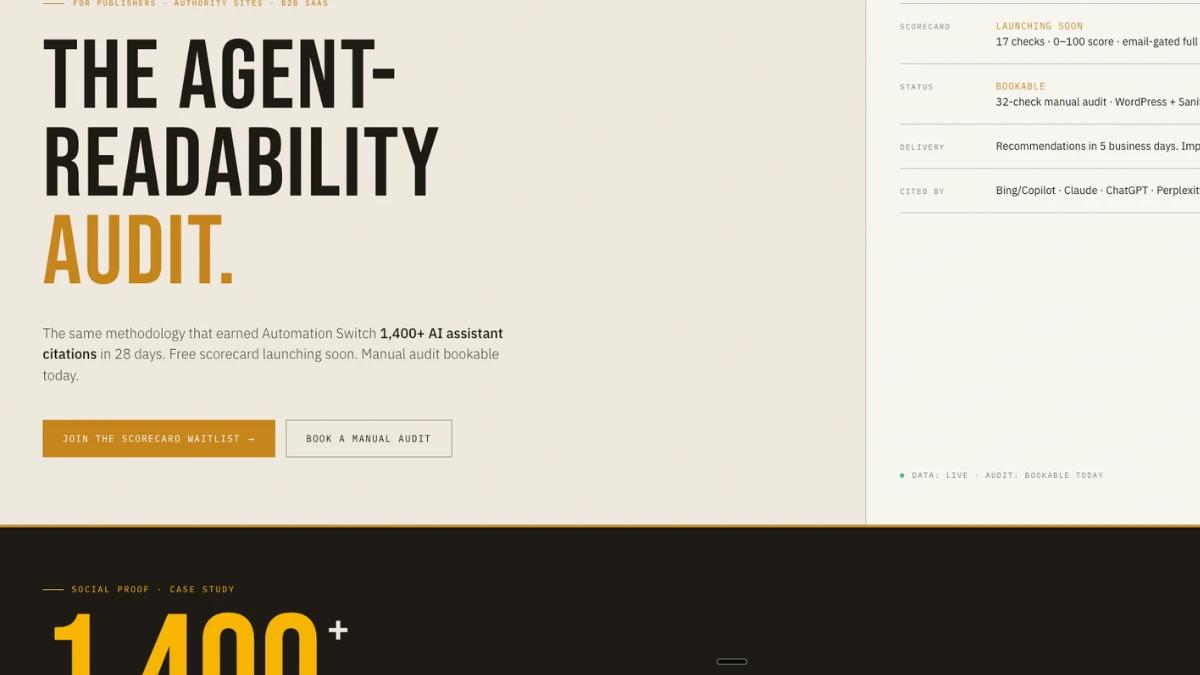
The most recent iteration was an interim landing page for an agent-readability audit tool we are deploying. I gave Claude Design our design system plus a product requirement document generated in Claude Code. Claude Design returned a high-fidelity prototype that landed on-spec, on-brand, and aligned with the AS design language.
To stretch the tool, I followed up with a wireframe brief that gave it room to propose options. Inside the AS token framework, it produced four design directions worth working from.
One quirk worth naming. The two tasks ran in two separate Claude Design projects. I was still able to call back into the first project from the second to pull revisions I liked. Outputs across separate projects can be merged into one. The project boundary stays porous on the design side.
The six export formats
Claude Design exports in six formats. Each one earns its place by deciding where the work lives next.
1. PDF. Design review with stakeholders who work outside the codebase.
2. PPTX. Same review use case for teams that live in Google Slides or PowerPoint.
3. Direct-to-Claude-Code link. The differentiator and the mechanism behind the lock-in. Pasting the link into Claude Code triggers a download of the design package from Claude Design. Inside is a README that Claude Code reads to pick up exactly where Claude Design finished. From there I refine, add behaviour, and ship.
4. ZIP archive. Full asset bundle for handoff to a separate development team.
5. Chat sequence. The prompt history that produced the design. Useful for audit, learning, and reproducing the iteration with adjusted prompts.
6. HTML alone. Clean HTML and CSS, ready to drop into a Next.js or static-site project.
Most AI design tools end at "here is your design, copy and paste." The Claude Code link option closes the loop: the design generates, the agent refines, the code ships. End-to-end inside Anthropic tooling.
The design tokens bridge
The output stays on-brand only when the tool sees the design system. Claude Design accepts tokens as prompt context.
My workflow:
- Open the Automation Switch design token generator at
/tools/design-token-generator. - Export tokens in the AI Prompt format (a structured block with hex values, font stacks, and style rules).
- Paste that block into Claude Design as the first turn.
- Describe the page or component.
- Iterate.
The CSS variables in the generated HTML match the source tokens exactly. Same colours, same fonts, same spacing scale.
Token-fed iterations stay on-brand. The same tokens compile into matching CSS variables on every regeneration, holding the brand line.
Three iterations of the AS MCP Server Directory
The Automation Switch (AS) MCP Server Directory was designed across three Claude Design iterations using AS design tokens. Each iteration was a separate export.
Iteration one was a wireframe pass: rough structural exploration of the directory layout. Iteration two was the first detailed design with full token application. Iteration three was the refinement based on review feedback, with tighter spacing and improved card hierarchy.
The CSS variables in the generated HTML show the token continuity directly:
:root {
  --bg: #f0ebe0;
  --bg-inv: #1e1a14;
  --amber: #c8861a;
  --amber-bright: #f9b700;
  --display: "Bebas Neue", Impact, sans-serif;
  --sans: "IBM Plex Sans", system-ui, sans-serif;
  --mono: "IBM Plex Mono", ui-monospace, monospace;
}
These are the exact tokens that power Automation Switch. The HTML adopted them on first generation. The output landed developer-ready on first export.
Each iteration took roughly 15 minutes inside Claude Design plus 5 minutes of review. Total time across three iterations: about an hour.
Cost per iteration vs. traditional design
The 30-minute, three-iteration workflow lands differently when set against what comparable design work usually costs. Industry rate cards across tiers:
| Criteria | Example | Typical cost for a landing page | Source |
|---|---|---|---|
| Top-tier global agency | Pentagram | $150,000+ engagement minimum, extending to $500,000+ for comprehensive brand systems | Metabrand startup branding guide |
| Specialised landing-page agency | Apexure | $3,000-$5,000 per custom landing page | Apexure pricing breakdown |
| Mid-tier digital agency (Clutch-listed) | Web design studios at $100-$149/hour | Most projects under $10,000; average $38,105; range $2,000-$100,000 | Clutch web design pricing |
| Boutique / experienced agency | Mid-market design shops | $500-$3,000 per landing page; up to $5,000 at the premium end | Unbounce landing page cost guide |
| Freelance, certified senior | Experienced Fiverr / Upwork senior | $300-$3,000 per project | Sketchish landing page prices |
| Freelance, entry | Fiverr basic / Upwork junior | $80-$150 per project (Fiverr); $13-$179/hour (Upwork) | Sketchish landing page prices |
| AI-assisted (Claude Design + Claude Code) | This workflow | Claude subscription plus a separate weekly Claude Design allowance | See Where Claude Design falls short |
The comparison sits one tier removed from like-for-like. A Pentagram engagement buys strategy, brand system, and stakeholder alignment that lives outside what an AI tool produces. A $300 Fiverr landing page is a single deliverable rather than a design system. The honest read: Claude Design plus Claude Code replaces the production-translation step (designer to developer handoff). The strategic design work still belongs with humans.
Even with that caveat, the cost-per-iteration math shifts. Three iterations of the Automation Switch MCP Server Directory came in at about an hour of operator time on top of the existing Claude subscription. A specialised landing-page agency would charge $3,000-$5,000 for the same single page with iterations included, on a 2-4 week timeline. A senior freelancer would charge $300-$3,000 with similar revision rounds. The production-iteration work has changed price tier.
The coherence paradigm
The new mental model is design, code, and deployment as one continuous chain. The old model was distributed. Hire a designer, take the brief away, fire it back as a deck or a Figma file. A developer would translate. A deployment engineer would ship. Each fire was a context handoff that lost half the intent. Each node held its piece in a different tool, in a different vocabulary, in a different head.
The new shape concentrates exclusivity inside the Anthropic chain. Claude Design holds the canonical design work. Claude Code holds the canonical code work. Claude CoWork holds the multi-agent orchestration. The list keeps growing. Each layer's source of truth lives inside one tool that speaks the same language as its neighbours.
Removal of friction is what makes the Anthropic tools sticky. When friction is high between tools, you switch. When friction is low, you stay. Claude Design takes the design-to-code friction down to a single link. That is what changes the daily decision.
The proof is parallel. The design loop runs while another Claude agent works a different part of the repo. The coherence is structural and sequential at once.
The flywheel
The handoff in Claude Design is a nice touch and the strategic move. The link drops into Claude Code, the README primes the agent with the design's intent, the components produced, and the next steps. Context carries forward through the chain.
From the operator side, that turns "stay inside the Anthropic chain" into the default path. I stay focused inside Claude Design when the next step is already wired up.
The flywheel shows up in unexpected places. I have caught myself reaching for Claude Design for slide decks outside the Automation Switch scope. PowerPoint exports, Google Slides briefs. The subconscious default has shifted: a design problem cues a Claude Design tab as the first move ahead of Figma or Keynote. That is what an ecosystem flywheel looks like when it works on you.
The honest read: Codex still runs on a few of my projects and validates work Claude does, so my stack has stayed multi-vendor. Even so, Anthropic has built a flywheel. Tooling muscle memory, prompt vocabulary, auth surfaces, billing, daily integrations all compound. For builders already Claude-aligned (Claude Code as primary, Claude Desktop for chat), Claude Design is the design layer that speaks the same language as the rest of the stack.
Where Claude Design falls short
Pricing and limits
Usage was the first ceiling I hit. My Claude subscription progressed from £20/month on Pro to the £200/month Max 20x tier, which is bundled with the rest of my Anthropic stack. Claude Design ran out within the first day of use.
Verified: Claude Design is metered independently from the rest of Claude, with its own weekly allowance separate from the Pro or Max subscription. The allowance resets every seven days. The plan descriptors map roughly: Pro for "quick explorations, one-off use," Max 5x for "semi-regular use," Max 20x for "power use" (Claude Help Centre). Even on the top tier, an operator running multiple iterations a day can drain the allowance in one sitting.
Extra usage is available for purchase. Price details surface inside the account flow rather than the public help centre. Factor that in before Claude Design becomes the daily driver for design work.
Wireframe to production needs a second pass
The first iteration of the AS interim landing page started in wireframe mode. Wireframes export cleanly to Claude Code. The deployed artifact required a few extra rounds in Claude Code to match what the Claude Design preview looked like. The wireframe is structure. Final design follows.
The lesson: pick the high-fidelity option when the design needs to land production-ready. The smoother path is to start in wireframe, import that wireframe project into a high-fidelity project once the structure is approved, then hand off the high-fidelity prototype to Claude Code. Fewer rounds, closer match between preview and shipped output. The porous project boundary I mentioned earlier is what makes this two-step workflow tractable.
Capabilities outside this review's scope
Claude Design produces more than HTML. The platform also generates slide decks (PPT, Google Slides) and animations, and the surface keeps expanding. The slide-generation path has held up for presentations outside the Automation Switch scope. Animations, video, and whatever Anthropic ships next sit on my list to stress-test. This review covers what I have run in production: the design-to-HTML path, the export formats, and the token-driven workflow. The honest scope.
Background dependence
The 30-minute, three-iteration loop assumes a specific operator profile. The cross-stack background I described in the opener removes friction at the handoff that operators coming from one side alone will still have to pay.
If your background sits on the design side of the stack, expect more rounds with Claude Code refining the implementation layer after the export. If your background sits on the development side, expect more turns refining the visual output before it lands on-brand. The tool is forgiving about which side you come from. The friction shifts based on which vocabulary is yours and which one is new.
When Claude Design wins
- The work already lives inside the Anthropic ecosystem (Claude Code, Claude Desktop).
- The design needs to flow into production code as one continuous pass.
- You have a design token system you can feed in as prompt context.
- The output target is developer-ready HTML and CSS.
- Stakeholder review formats (PDF, PPTX) and the code path live in the same tool.
When to reach for another tool
- The work needs native image generation as part of the design loop.
- The design system lives entirely in Figma and a Figma plugin handoff is the constraint.
- The team's broader workflow lives in a different tool chain.
What I am running with it now
The AS MCP Server Directory is shipping based on the three iterations Claude Design produced. The component library on AS is being extended using the same workflow. New page templates start as Claude Design iterations, get refined into production via Claude Code, and land on the live site through the AS Sanity-to-Next.js pipeline.
The token generator at /tools/design-token-generator keeps the loop reproducible. New iterations preserve brand fidelity end-to-end.
If you run a design system and you are evaluating AI design tools, two things matter: which ecosystem you want to live inside, and whether your tokens can flow as prompt context. Claude Design optimises for both, particularly if you already use Claude Code.
