
A chatbot answers your question. A copilot suggests your next move. An AI agent books the flight, updates your calendar, and sends the confirmation, all while you were making coffee. That spectrum from reactive to autonomous is reshaping how software gets built, and Gartner projects that 40% of enterprise applications will embed task-specific AI agents by the end of the year, up from less than 5% the year prior.
This guide closes that gap. It explains what the term actually means, how agents work under the hood, and where autonomy ends and automation begins. If you are evaluating whether agents belong in your workflow stack, or trying to understand how they relate to the automation tools your team already uses, this is the starting point. By the end, you will have the vocabulary and the architectural mental model to make that decision with confidence.
The Core Idea: What Is an AI Agent?
The simplest definition comes from the people building the cloud infrastructure underneath them. Google Cloud defines an AI agent as "a software system that uses AI to pursue goals and complete tasks on behalf of users, independently choosing the best actions to achieve those goals." IBM and AWS converge on nearly identical language.
That definition contains the word that separates agents from everything that came before: independently. A traditional chatbot waits for your prompt and returns a response. An AI agent receives an objective, breaks it into subtasks, selects tools, executes actions, evaluates results, and adjusts its approach, all with minimal human intervention.
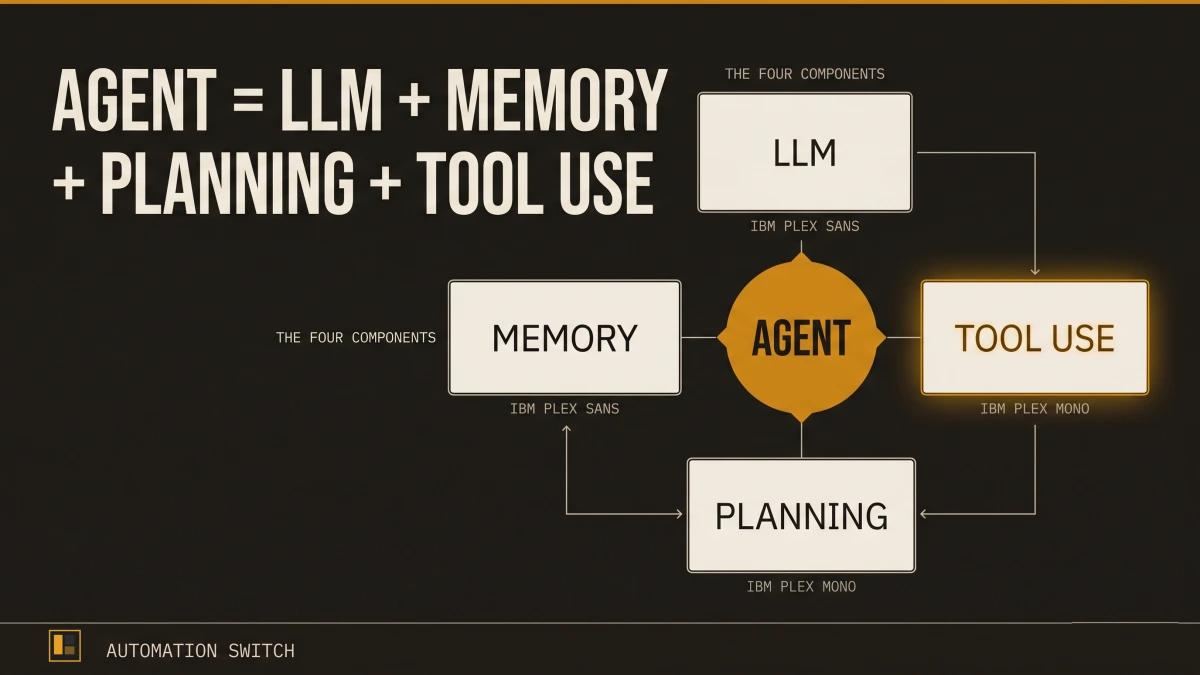
OpenAI researcher Lilian Weng crystallized the architecture into a formula that has become the standard reference across the industry:
Agent = LLM + Memory + Planning + Tool Use
The language model is the brain. Memory gives it context across interactions. Planning lets it decompose complex goals into executable steps. Tool use bridges the gap between reasoning and real-world action.
Or, as the Oracle Developers blog puts it with admirable bluntness: "The architectural difference between a chatbot and an agent is simple: a chatbot is one LLM call; an agent is an LLM calling tools in a loop until the job is done."
The Autonomy Ladder: Chatbot to Copilot to Agent
AI systems fall on a spectrum of autonomy. Understanding where each type sits helps operators choose the right tool for the right job.
Level 1: Chatbots (Talk Only)
Chatbots follow rules-based dialogues and answer predefined questions. They operate within a fixed decision tree. When a customer asks about a return policy, a chatbot sends a link to the return policy page.
Level 2: Copilots (Suggest, Human Approves)
A copilot sits alongside you and suggests actions inline while you remain the decision-maker. GitHub Copilot suggests code completions. Microsoft 365 Copilot drafts an email summary. The human reviews, edits, and approves every action before it takes effect.
Level 3: Agents (Execute Autonomously)
An AI agent operates with delegated authority. Give it a goal, and it determines how to achieve it. That same return request? An AI agent processes the return, generates a shipping label, updates inventory, and notifies the customer when the refund is complete. The human sets the objective and the guardrails; the agent handles everything in between.
Level 4: Autonomous Systems (Self-Plan and Self-Correct)
At the highest level, autonomous systems plan their own objectives, monitor their own performance, and self-correct across sessions. Most production systems today operate at Level 3, with Level 4 still largely in research and controlled environments.
Why this matters for operators: the boundaries determine your risk profile. A copilot that suggests the wrong email draft is a minor annoyance. An agent that processes the wrong refund is a financial event. The autonomy level you deploy should match the trust level you can verify.
Inside the Reasoning Loop: How Agents Think
The engine that makes an agent more than a chatbot is the reasoning loop. Instead of producing a single response and stopping, an agent cycles through a structured process until the task is complete.
The ReAct Pattern
The most widely adopted reasoning pattern is ReAct (Reasoning + Acting), which interleaves reasoning traces with tool actions in a three-step cycle:
Thought: The agent reasons about what it knows and what it should do next. ("The user wants to book a flight from London to Tokyo. I need to check available flights for the requested dates.")
Action: The agent calls an external tool. (Calls the flight search API with the specified parameters.)
Observation: The agent receives the result and evaluates it. ("Three flights are available. The cheapest option is with ANA at $890. I should present the options to the user.")
The cycle repeats. If the observation reveals a problem (the flight is sold out, the API returns an error), the agent generates a new Thought, selects a different Action, and continues until the objective is met or the agent determines it requires human input.
Beyond ReAct: Plan-and-Execute
ReAct works well for shorter tasks, but longer workflows benefit from separating planning from execution. The Plan-and-Execute pattern operates in three phases:
- Planner generates a full task breakdown upfront.
- Executor works through each subtask sequentially.
- Re-planner adjusts the plan when execution diverges from expectations.
This separation lets the system handle multi-step workflows that take minutes or hours to complete, because the executor can work through its task list while the planner monitors overall progress and adapts the strategy.
The Four Components, Explained
Lilian Weng's formula identifies four components. Here is what each one does in practice.
1. The Language Model (The Brain)
The LLM is the reasoning engine. It interprets instructions, generates plans, decides which tools to call, and evaluates results. Every other component feeds into or receives output from the model.
The quality of the model directly constrains the quality of the agent. A model that hallucinates tool names or misinterprets observations will produce an agent that spins in loops. This is why the choice of foundation model matters, even when the orchestration framework handles everything else.
2. Memory (The Context)
AI agent memory comes in two forms:
Short-term memory holds the immediate conversation context: the current task, recent tool outputs, and the reasoning trace. This lives within a single interaction and is typically bounded by the model's context window.
Long-term memory persists across sessions, tasks, and time. It stores learned preferences, past decisions, accumulated knowledge, and user-specific context. Implementations range from simple key-value stores to vector databases that enable semantic retrieval.
Memory is what turns a stateless model into a system that learns. An agent with only short-term memory forgets everything between sessions. An agent with both can remember that your team prefers direct flights, that the project budget is $50K, and that the last three deployment attempts failed because of a specific configuration issue.
3. Planning (The Strategy)
Planning is the ability to break a complex goal into a sequence of executable steps. When you tell an agent "prepare the quarterly report," planning is what decomposes that into: gather revenue data from the finance API, pull customer metrics from the CRM, generate visualizations, compile the narrative, format to template, and send for review.
The sophistication of the planning module determines the ceiling of what an agent can handle. Basic planning produces linear task lists. Advanced planning generates dependency graphs, identifies parallelizable steps, and includes contingency paths for likely failure modes.
4. Tool Use (The Hands)
Tools are what allow agents to go from thinking to doing. A language model can reason about sending an email, but it requires a tool (the email API) to actually send one.
Common tool categories include:
- APIs: REST endpoints, GraphQL queries, database connections
- Code execution: Running Python, JavaScript, or shell commands in a sandboxed environment
- Search: Web search, document retrieval, knowledge base queries
- File operations: Reading, writing, and transforming documents
- Communication: Sending emails, Slack messages, calendar invitations
The breadth of available tools defines the breadth of what an agent can accomplish. An agent with access to your CRM, calendar, and email can handle end-to-end customer interactions. An agent with access to only a search tool can research and summarize, but it relies on a human (or another agent) to act on the findings.
How Agents Connect to the World: MCP and Tool Calling
Every agent needs a way to discover and invoke tools. Historically, each framework and each vendor built custom integrations. If you wanted your agent to connect to Slack, you wrote a Slack integration for LangChain. If you wanted the same agent to work in a different framework, you rewrote it.
The Model Context Protocol (MCP)
MCP is an open standard introduced by Anthropic to standardize how AI systems integrate with external tools, systems, and data sources. Think of it as a universal adapter, or as the analogy that stuck: "USB-C for AI."
Before MCP, connecting an agent to ten tools required ten custom integrations per framework. With MCP, a tool provider publishes a single MCP server, and any MCP-compatible agent can discover and call that tool.
MCP and Frameworks: Complementary, Separate
A common point of confusion: MCP complements agent orchestration frameworks (LangChain, LangGraph, CrewAI) but serves a different purpose. MCP standardizes tool discovery and calling. Frameworks decide when and why to call a tool. MCP handles the plumbing; the framework handles the reasoning.
This means you can use MCP-connected tools inside LangChain, CrewAI, or a custom agent built from scratch. The tool integration remains consistent regardless of the orchestration layer.
Browse the MCP Directories index for a scored overview of every major MCP server directory, registry, and meta-index.
The Framework Landscape: A Quick Map
Several open-source and commercial frameworks provide the scaffolding for building agents. Each optimizes for a different use case.
LangChain / LangGraph is the most widely adopted framework, with 300+ integrations and a ReAct-style tool-calling loop at its core. LangGraph extends LangChain with stateful, graph-based orchestration for complex multi-step workflows. Best for teams that need breadth of integrations and a mature ecosystem.
CrewAI is designed for role-based multi-agent collaboration. You define agents with specific roles (researcher, writer, editor), assign them tasks, and let them collaborate. Best for workflows where different perspectives or specialties need to coordinate.
PydanticAI brings type safety and Pydantic model validation to agent development, offering what its creators describe as "the FastAPI feeling applied to GenAI." Best for production teams that prioritize runtime type safety and structured outputs.
OpenAI Agents SDK provides a lightweight, opinionated framework from OpenAI with built-in tool calling, handoffs between agents, and guardrails. Best for teams already invested in the OpenAI ecosystem.
Google Agent Development Kit (ADK) is Google's entry, designed for tight integration with Gemini models and Google Cloud services. Best for teams building on Google's infrastructure.
| Criteria | LangChain / LangGraph | CrewAI | PydanticAI | OpenAI Agents SDK | Google ADK |
|---|---|---|---|---|---|
| Core pattern | ReAct + graph orchestration | Role-based multi-agent | Type-safe single-agent | Tool calling + handoffs | Gemini-native orchestration |
| Integrations | 300+ | Role-based tasks | Growing ecosystem | OpenAI ecosystem | Google Cloud services |
| Type safety | Minimal | Built-in (Pydantic) | |||
| Multi-agent | Core strength | Core strength | Supported | Handoff-based | Supported |
| Best for | Complex stateful workflows | Team-based collaboration | Production type safety | OpenAI-first teams | Google Cloud teams |
The most successful implementations use simple, composable patterns rather than complex frameworks.
For scored, editorially reviewed comparisons of every major framework, browse the Agent Frameworks Directory.
Where Agents Are Being Used Today
The adoption data tells a clear story: agents have moved from experimentation to production.
Another 23% are actively scaling their deployments.
The global AI agents market reached approximately $7.6 to $7.8 billion, and Grand View Research projects it will hit $50.31 billion by 2030 at a 45.8% CAGR.
45.8% compound annual growth rate from a $7.6B base.
Telecom (48%) and retail/consumer packaged goods (47%) lead in agent adoption, followed by financial services and healthcare. Common use cases include customer service automation, IT helpdesk triage, code generation and review, data analysis pipelines, document processing, and sales outreach orchestration.
The Governance Gap
Only 21% of companies report having a mature governance model for autonomous agents, according to Deloitte's enterprise AI survey. That means roughly four out of five organizations deploying agents are doing so with incomplete oversight frameworks.
Over 40% of agentic AI projects face cancellation risk when governance, observability, and ROI clarity are established too slowly. 94% of organizations mixing custom-built and pre-built agents report that agent sprawl is increasing complexity, technical debt, and security risk.
For operators, the takeaway is direct: deploying an agent is a technical challenge; governing a fleet of agents is an organizational one. Both require investment, and governance should start alongside development, well before production.
What to Watch For
If you are evaluating or building AI agents, three patterns are worth tracking.
1. Governance Must Match Pace with Adoption
The gap between deployment speed and governance maturity is the highest-risk pattern in enterprise AI right now. Agents that operate autonomously require identity management, audit trails, permission boundaries, and kill switches. Building these after deployment is significantly more expensive than building them in from the start.
This is the problem we are working on at Scaletific. The Agent Enforcement Plane (AEP) provides governance infrastructure that sits between your agents and your production systems: contract-based execution validation, permission enforcement, and audit trails that apply consistently across every agent in your fleet, regardless of the framework they use. Combined with Golden Path, our internal developer platform for agent governance, it gives engineering teams a way to scale agent deployments with confidence.
2. Demo-Ready Is Far from Production-Ready
An agent that works in a demo handles the happy path. A production agent handles edge cases, rate limits, tool failures, ambiguous inputs, and adversarial prompts. The engineering effort between the two is typically a 10x multiplier. Budget accordingly.
3. Simple and Composable Beats Complex
Anthropic's research on building effective agents found that the most successful implementations favored simple, composable patterns over elaborate multi-agent architectures. Start with a single agent, a clear objective, and a small set of tools. Add agents and coordination only when a single agent demonstrably reaches its limits.
Your Next Step
This article covers the foundations: what agents are, how they reason, what they are made of, and where the market stands. From here, the path branches depending on what you are building.
The era of AI agents is well underway. The question is whether your team is building them with the clarity and governance they require.
Once the conceptual model lands, the next step is to build something. For the practical walkthrough, see the step-by-step guide to building your first AI agent. For the framework choice that shapes everything downstream, see the agent framework comparison across LangChain, CrewAI, AutoGen, and LangGraph.
