
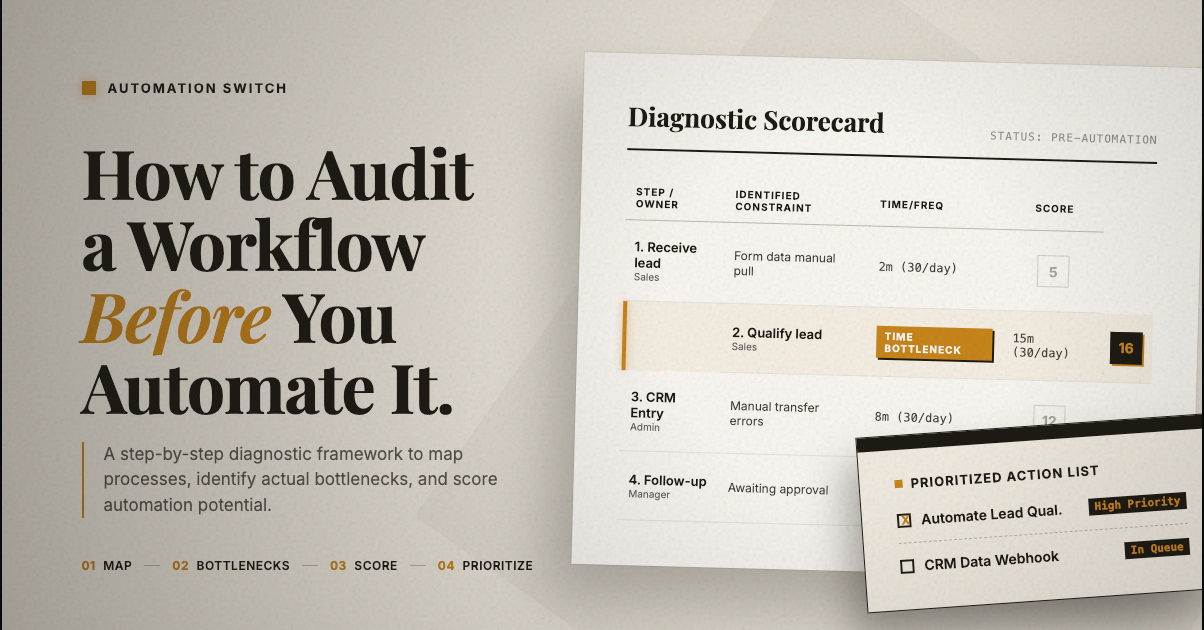
Most automation projects fail because the workflow was never understood properly before someone started building. Ernst & Young estimates that 30 to 50 percent of RPA projects fail on the first attempt. The pattern is consistent across industries: teams pick a tool, start connecting nodes, and discover two weeks later that the process they automated had six undocumented exceptions that break the entire flow.
The failure pattern is usually process selection and undocumented exceptions, not a lack of automation tooling.
A workflow audit is the step between "we should automate this" and "let me open Make and start building." It takes one to three hours per workflow and prevents weeks of rework. This is the framework we use at Automation Switch before building anything.
Why I Built This Framework
I learned the cost of skipping audits the hard way. At Scaletific, we scaled the team quickly. More clients meant more operational complexity, which meant more people handling more tasks across more tools. The instinct was always the same: hire to solve the problem.
What we discovered over time was that many of the roles we had filled were executing workflows that could have been structured, documented, and partially automated before a person ever touched them. We ended up scaling back and restructuring around fewer people who understood how to use the right tools to multiply their output. One operator with Make, a well-structured Notion database, and a clear process map could handle what previously took three people doing manual handoffs.
That experience shaped how I approach every automation decision at Automation Switch. The audit framework in this article exists because I have seen both sides: the cost of automating without understanding the workflow, and the cost of hiring to paper over a process that should have been automated from the start.
The lesson is straightforward. Map it, score it, then decide whether it needs a tool or a person. The audit takes hours. The wrong decision costs months.
Why Audit Before You Automate
Three patterns repeat across automation failures.
The automation graveyard. A workflow gets automated, breaks the first time an edge case appears, someone disables it, and the team goes back to manual. The automation is never fixed because nobody owned it. Poor process selection is one of the top reasons RPA projects fail: either the process is less robotic than initially assumed, or the environment is more dynamic than anyone identified upfront.
The annoyance trap. You automate the step that frustrates you most instead of the step that costs the most time. The step that frustrates you may take five minutes. The step nobody complains about might take three hours. McKinsey found that 67 percent of knowledge workers spend over three hours per day on manual coordination tasks like data entry, status updates, and report generation. The audit finds those hidden hours.
Automate the step that burns the most hours, not the step that irritates the team most. The audit exists to surface hidden time cost before you open a builder.
No spec, no accountability. Without a documented understanding of what the workflow should do, you cannot evaluate whether the automation works correctly. You end up in endless revision because the requirements were never written down.
The audit solves all three: it finds the high-value steps, prioritises by actual cost, and produces a specification document before anyone opens a tool. Organisations that document their processes before automating see materially better productivity gains than those that skip this step.
Step 1: Map the Current State
Document every step, including the obvious ones
For each step in the workflow, record:
- Who does it: person or role
- What triggers it: another step, a time, or an event
- What inputs it needs: data, files, approvals
- What outputs it produces: a document, a notification, a database update
- How long it takes per instance
- How many times per week it runs
Include the informal workarounds. Every workflow has steps people do not think of as steps because they have done them for so long. Ask: is there anything you do that is not in the formal process?
Tools for mapping
Use a simple Notion table or spreadsheet first. The point is to surface the real workflow, including informal workarounds, before making it look tidy.
For complex workflows, have someone do the task on a Loom recording while narrating what they are doing. This captures steps that are invisible to the person mapping but obvious to the person executing.
Step 2: Identify Bottlenecks
With the current state mapped, find where the workflow breaks down.
Time bottlenecks
Which steps take the longest? Which steps block other steps from starting? Multiply time per instance by frequency. A two-minute step that runs 100 times per day costs more than a 30-minute step that runs twice per week.
Error bottlenecks
Where do mistakes happen most? Manual data entry and handoffs between people are the most common error sources. Ask: what goes wrong with this workflow, and what do you re-do most often?
Dependency bottlenecks
Which steps require waiting for a person, an approval, or an external system? Waiting is invisible cost. It does not show up in time-per-step metrics, but it slows the whole process.
Step 3: Score Each Step for Automation Potential
Not every step should be automated. Score each step on four dimensions.
| Criteria | Score 1 | Score 5 | Notes |
|---|---|---|---|
| Repetitiveness | Varies every time | Identical every time | Same data, same actions, same outputs |
| Rule-based | Requires judgment | Clear decision rules | Can you write an if-then spec for it? |
| Data availability | Manual, unstructured | Digital, structured | Is the data already in a system? |
| Judgment required | High | Low | Does it require human context? |
Scoring thresholds:
- 16 to 20: Strong automation candidate. Build it first.
- 11 to 15: Good candidate. Worth automating, may need some data preparation.
- 6 to 10: Partial automation potential. Automate parts, keep a human in the loop.
- 4 to 5: Keep manual. Automation will not hold.
Common high-scoring steps include data entry from one system to another, notification sending, document generation from templates, scheduled reports, and status update routing. Common low-scoring steps include client relationship management, complex judgment calls, creative work, and exception handling where every case is different.
Step 4: Prioritise by Hours Saved
Rank automation candidates by hours saved per week multiplied by automation potential score. This surfaces the highest-value automations: the ones that return the most time relative to their build complexity.
Build rule: start with the top-ranked item. Build one automation. Run it alongside the manual process for two weeks. Confirm it works. Then build the next one.
This approach catches edge cases before you have committed to ten automations that all need fixing. It also builds confidence in the process before you automate critical workflows.
The Audit Deliverable
- 01Workflow map
Document the current state in table form so the process is visible before any automation work begins.
- 02Bottleneck summary
Capture the main time, error, and dependency bottlenecks in short bullets.
- 03Automation scorecard
Score each step on repetitiveness, rule-based potential, data availability, and judgment required.
- 04Prioritised automation list
Rank candidate automations by hours saved multiplied by automation potential score.
- 05Recommended first automation
Define the trigger, steps, conditions, and expected output for the one workflow to build first.
This document becomes the build spec. Hand it to whoever implements the automation and the implementation will take hours, not days. Without this document, the builder is guessing at requirements, and every guess is a potential failure point.
Next Steps
Start with one workflow, map the current state in full, and score each step before you automate anything. The goal is not to automate more. The goal is to automate the right step first and prove it works before you expand the stack.
The audit framework above is the entry point. For the deeper checklist of what every audit should cover, see what a good automation audit should actually include. For the architectural patterns that turn audited workflows into production-grade automation, see patterns that hold up in production.
