
Most developers configuring AI coding agents never discover that the most powerful form of customisation ships as a plain markdown file. Here's what SKILL.md files are, where they live, and the growing ecosystem of skills directories that's emerged around them.
The Problem With General-Purpose Agents
If you've spent any time configuring an AI coding agent, whether that's Claude Code, GitHub Copilot, or a custom setup, you've probably noticed the same thing. The agent is capable. It can write code, refactor functions, review contracts. But it's a generalist. Ask it to design an API, and it gives you a competent answer. Ask it to design an API the way your team does it, with canonical paths, machine-readable denial codes, and OpenAPI alignment, and it guesses.
The gap between a capable agent and a useful one is specialisation. And specialisation, it turns out, has a file format.
What Is a SKILL.md File?
A SKILL.md file is a structured markdown document that gives an AI agent a focused operating mode for a specific task domain.
Think of it as a prompt template promoted to a first-class citizen. Instead of pasting a long system prompt each time you want the agent to behave in a particular way, you define that behaviour once in a SKILL.md file. When you invoke the skill, the agent loads that context, switches into the defined mode, and operates within the rules, workflows, and checklists you've specified.
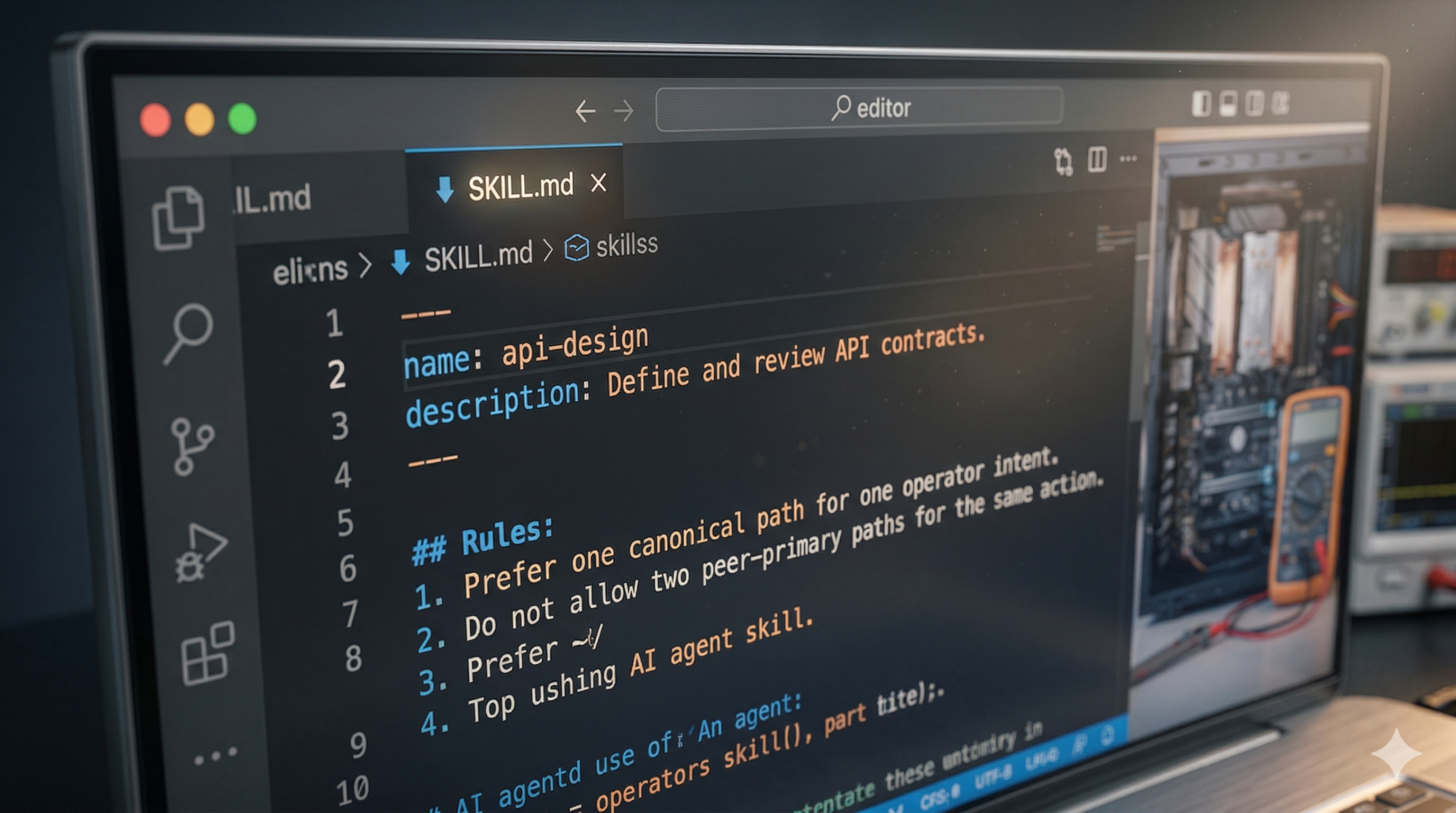
A skill file has two parts: a YAML frontmatter header that names and describes the skill, and a markdown body that defines how the agent should operate in that domain.
Here's an abbreviated example from a real api-design skill:
When an agent loads this skill, it answers API design questions according to a specific, consistent model. It knows to flag dual-primary paths as drift. It knows to model failure states before implementation. It knows the review checklist to apply at the end.
That's a different kind of agent than the default.
What Makes a Good Skill
Before getting into where skills live and how to find them, it's worth understanding what separates a well-constructed skill from a vague one.
Clear scope declaration. The best skills say explicitly what they are for and, critically, what they are not for. An api-design skill that says "do not use for frontend component design or database-only schema work" prevents the agent from applying it in contexts where it doesn't fit.
Concrete rules, not general advice. "Write clean code" is not a rule. "Never leave transitional behaviour undocumented" is a rule. The difference matters when the agent is deciding whether a specific action complies with the skill.
A workflow, not just a checklist. A checklist tells the agent what to verify. A workflow tells the agent what order to do things in and what questions to ask along the way.
Acceptance criteria. A skill that defines what done looks like is a skill the agent can actually complete. "The work is only complete when the contract is coherent, the path is canonical, and surrounding docs and tests match implementation" is an acceptance criterion. "Make it good" is not.
How Skills Work in Agent Systems
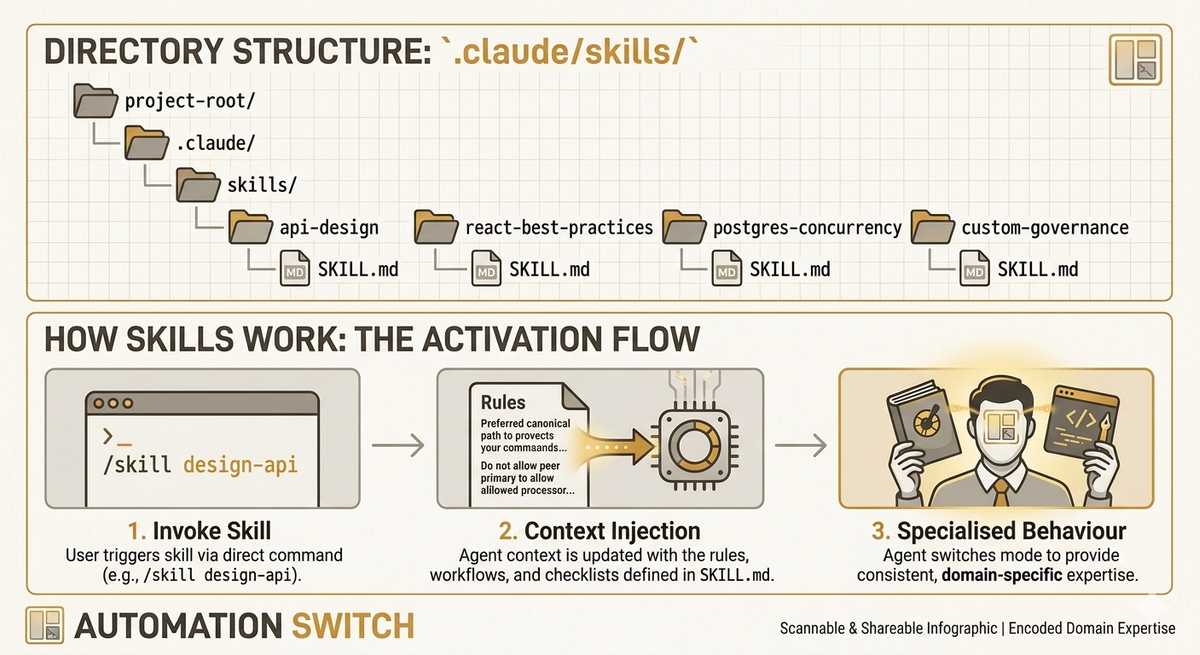
Skills work through context injection. When you invoke a skill by name, typing /api-design in Claude Code for example, the agent loads the SKILL.md file into its active context. From that point in the conversation, it operates with the skill's rules, workflows, and checklists as first-class constraints.
The effect is similar to bringing a specialist into the conversation. Before the skill is loaded, the agent is a competent generalist. After it's loaded, the agent has a specific opinion about how this kind of work should be done.
This matters because it shifts two things:
Consistency. Without a skill, the same agent will give different answers to similar questions on different days. With a skill, the same rules apply every time. A coding-standards skill enforces the same patterns whether you're on a Monday morning or a Friday afternoon.
Scope control. A well-written skill also tells the agent what to avoid, keeping it from drifting into territory where the skill's rules don't apply.
The Agent Skills open standard, which the format is built around, describes skills as giving agents "the context they need to do real work reliably." The standard is supported by Claude Code, GitHub Copilot in VS Code, Cursor, Gemini CLI, Aider, and a growing list of other agent platforms.
Where Skill Files Live
This is where it gets interesting for teams and for anyone thinking about sharing skills publicly.
Project-level skills
The most common location is inside your project's agent configuration directory. For Claude Code, that's .claude/skills/:
Skills at this level are scoped to the project. When you open Claude Code in this directory, those skills are available. Your API design skill can reference your team's specific conventions.
For GitHub Copilot in VS Code, the equivalent is .github/skills/. Skills placed there are automatically discovered when an agent is working in that repository.
Team-level shared repos
For teams wanting consistent agent behaviour across multiple projects, skills live in a shared internal repo. Engineers clone or reference the skills directory, and everyone's agents operate from the same rulebook.
This solves the "every developer's agent behaves differently" problem that emerges as AI-assisted delivery scales. One canonical coding-standards skill means one consistent code style, not a style that drifts based on which agent wrote which file.
Public, discoverable skills
The third location is where the ecosystem gets interesting: public repositories.
Major platforms and libraries are already publishing official skill sets:
- vercel-labs/agent-skills: Vercel's official skills covering React/Next.js best practices (40+ rules across 8 categories) and web design guidelines (100+ rules covering accessibility, performance, and UX)
- supabase/agent-skills: Supabase's Postgres performance skills, installable with
npx skills add supabase/agent-skills - streamlit/agent-skills: 17 sub-skills for Streamlit development, covering dashboards, chat UIs, multi-page apps, session state, performance, theming, and more
- github/awesome-copilot: GitHub's curated skills collection including agent governance, agentic evaluation, and code review patterns
These are official tooling from engineering teams building with agents in production.
The Ecosystem Is Larger Than You Think
Beyond the official platform repos, a community of skill builders has emerged.
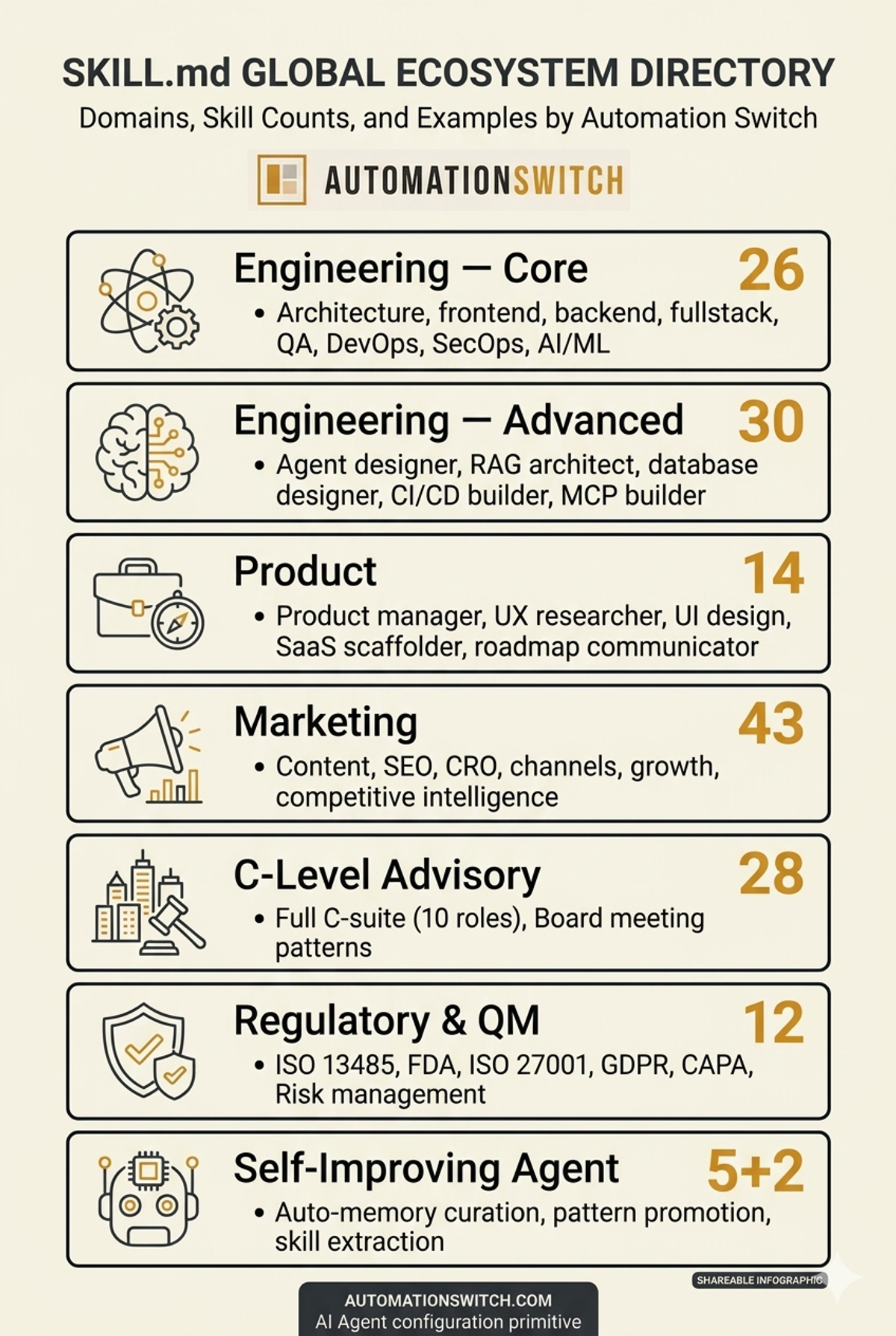
The most comprehensive collection is alirezarezvani/claude-skills: 205 production-ready skills across 9 domains, with 5,200+ GitHub stars. The breadth is striking:
And it works across 11 platforms: Claude Code, OpenAI Codex, Gemini CLI, Cursor, Aider, Windsurf, and more.
GitHub's mgechev/skills-best-practices repo documents how to write professional-grade skills and validate them using LLMs. The netresearch/agents-skill repo is a skill for generating AGENTS.md files, a skill that writes the specification files for other agents.
There's also tooling emerging around skills management. Skills can be installed from a marketplace via /plugin marketplace add commands in Claude Code. The npx skills add CLI lets you pull skills from GitHub repos with a single command.
The agentskills.io specification site documents the open format that most of these repos follow. It is the canonical reference for understanding exactly what the format requires.
Skills in Production: What Teams Are Actually Doing
A few patterns have emerged from how real teams are using skills.
Framework-specific skills from the maintainers themselves. The fact that Vercel, Supabase, and Streamlit have published official skills tells you something: the teams who know a framework best now have a channel for encoding that knowledge directly into agents. An agent with the Supabase skills loaded approaches Postgres schema design the way a Supabase engineer would, with knowledge of RLS patterns, connection pooling behaviour, and query optimisation techniques that wouldn't otherwise be in scope.
Skills as a replacement for onboarding docs. Several teams on Reddit describe using skills to encode the conventions new engineers used to learn through code review feedback. Instead of a developer discovering three months in that your team always separates UI from business logic in a particular way, the skill enforces it from day one of agent-assisted work.
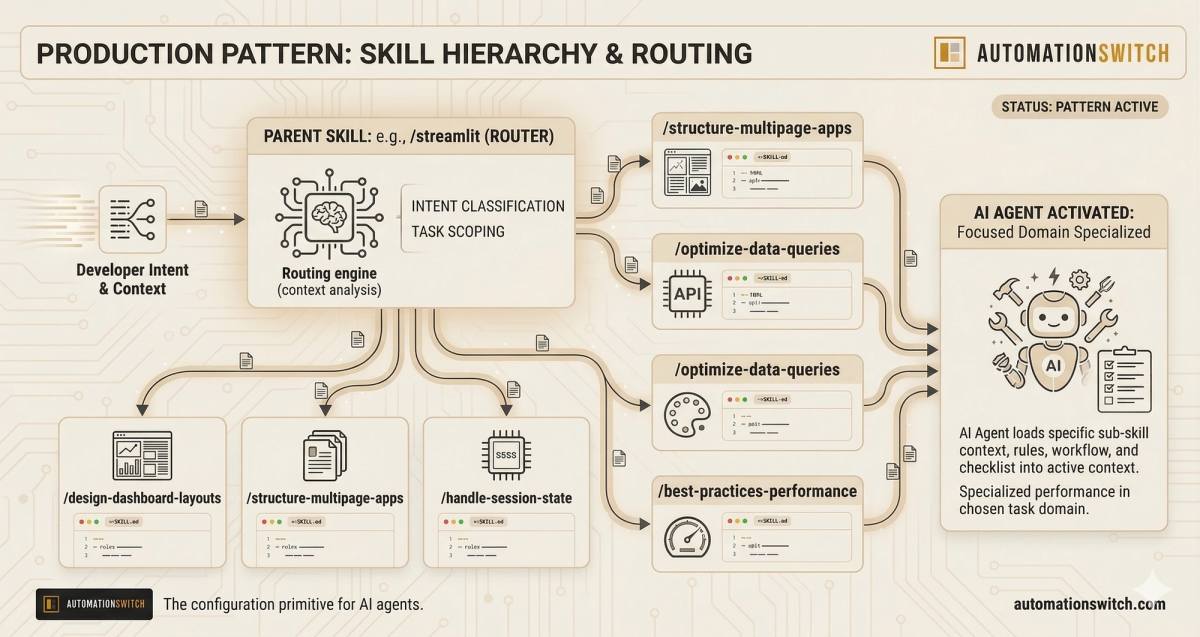
Skill hierarchies. The Streamlit repo shows a pattern worth borrowing: a parent skill (developing-with-streamlit) that routes to 17 specialised sub-skills depending on the task. The agent loads the parent, determines what kind of Streamlit work is being done, and loads the specific sub-skill. This keeps individual files focused while giving the agent breadth.
Cross-platform portability. The alirezarezvani repo's scripts/convert.sh converts skills to multiple agent formats. This matters as teams start running multiple agents: Claude Code for one workflow, Gemini CLI for another. Skills written once should be usable everywhere.
The Directory Problem
Every useful ecosystem eventually needs a directory. Package managers for libraries. Plugin registries for editors. App stores for mobile.
Skills don't have a good one yet.
The skills that exist are scattered across individual repos, discoverable only if you know where to look. The agentskills.io site documents the format but doesn't index what's been built. GitHub search returns fragments. There's no way to browse by domain, filter by agent platform, or find out what skills exist for your stack before you write your own.
That's why we built one.
The Automation Switch skills directory is a searchable, categorised, platform-tagged collection of SKILL.md files that builders can browse, copy, and contribute to. We seeded it using Firecrawl to crawl public repositories and surface skills that already exist in the wild, starting with what the community has already built and growing through contributions.
How Skills Connect to Your Automation Workflow
For builders using AI agents in production workflows, skills are a multiplier.
The agents most people run today are configured at the system-prompt level at best, or left at default at worst. That's fine for one-off tasks. It doesn't scale when you're running agents against real codebases, with real conventions, over extended sessions.
A team that has built a library of skills has effectively codified their engineering standards into a form agents can actually use. Your auth-patterns skill embodies the decisions your team made about JWT handling and session management. Your testing-workflows skill encodes the TDD cycle your team follows. An agent loading those skills operates within your conventions rather than guessing at them.
The commercial picture follows. The teams moving fastest with AI-assisted delivery have thought carefully about what their agents should do and built the configuration to make it consistent.
Where to Find Skills Today
The Automation Switch skills directory indexes skills across the ecosystem in one place. You can also go directly to the source repos:
Get Involved
The skills ecosystem is growing fast, and the best skills are still being written by practitioners solving real problems. If you've built skills for your own agent setup, even rough ones, they're probably more useful to someone else than you think.
Here's how to engage:
Browse the directory: search by domain, filter by platform, copy skills directly into your setup.
Submit a skill: if you have a SKILL.md file that works well, submit it. The bar is simple: does it make your agent more useful for a specific task?
Follow the index: we'll be publishing breakdowns of interesting skills we find in the wild, covering what makes them well-constructed, what domains they cover, and what the community is building.
The agent ecosystem is building its infrastructure right now. Skills directories, shared configuration formats, and agent coordination protocols are all being figured out in public. We built the piece that makes skills discoverable, because useful things that nobody can find might as well not exist.
Automation Switch is a hub for builders using AI agents and automation tools in production. If you're configuring agents, building workflows, or thinking about how to make AI-assisted work more consistent and governed, this is where we share what we're learning.
